
Whether you’re trying to change your name on Instagram or choosing a username for the first time, today’s guide has everything you need to know to craft the perfect name and get more Instagram profile viewers.
Key Points:
How To Create A Good Instagram Username
While your Instagram username might seem like a simple part of your profile, in many ways it’s the most important.
For one, it determines how memorable your profile is to users who are just scrolling through the comments section or Explore feed.
Plus, it impacts how searchable your profile is. If someone remembers your username but doesn’t know how to spell it, it decreases the chances of them actually finding and following you.
Because of this, it’s important to ensure that your Instagram username is not only unique, but memorable as well as easy to spell and remember.
Instagram Username Requirements
Every Instagram username has a limit of 30 characters.
Usernames can include: letters, numbers, periods, and underscores. Special characters are not allowed in usernames.
What Usernames Does Instagram Not Allow?
Aside from not being able to use usernames that have already been taken by another person, Instagram does not allow users to include the following in their usernames:
-
Domain names or URLs
-
Profanity
-
Hate speech
-
Graphic phrases
Additionally, if a username is claimed by an inactive or deleted account during the grace period you will not be able to use that handle. This is why sometimes you’ll receive an error when attempting to use a specific name, even if no accounts appear when you search for it.
Is It Better To Have A Short Username?
Usernames have a limit of 30 characters, but that doesn’t mean you should use them all.
The shorter your username is, the easier it will be for users to remember it and search it up. However, this comes with a caveat: using abbreviations can sometimes cause more confusion, so only use a short username if it truly works without abbreviations.
Should My Instagram Name Be My Real Name?
That depends on your profile. If you’re creating a personal or Creator account and aren’t shy about your identity, your real name is a solid choice since it’s unique to you.
You can also opt for it if you’re running a Professional account and your business name is tied to your real name.
Otherwise, choose something relevant to your profile niche.
How To Change Your Name On Instagram
If you already have an Instagram account and just want to spruce up your username, you can do so via the Instagram app and desktop site.
On Mobile
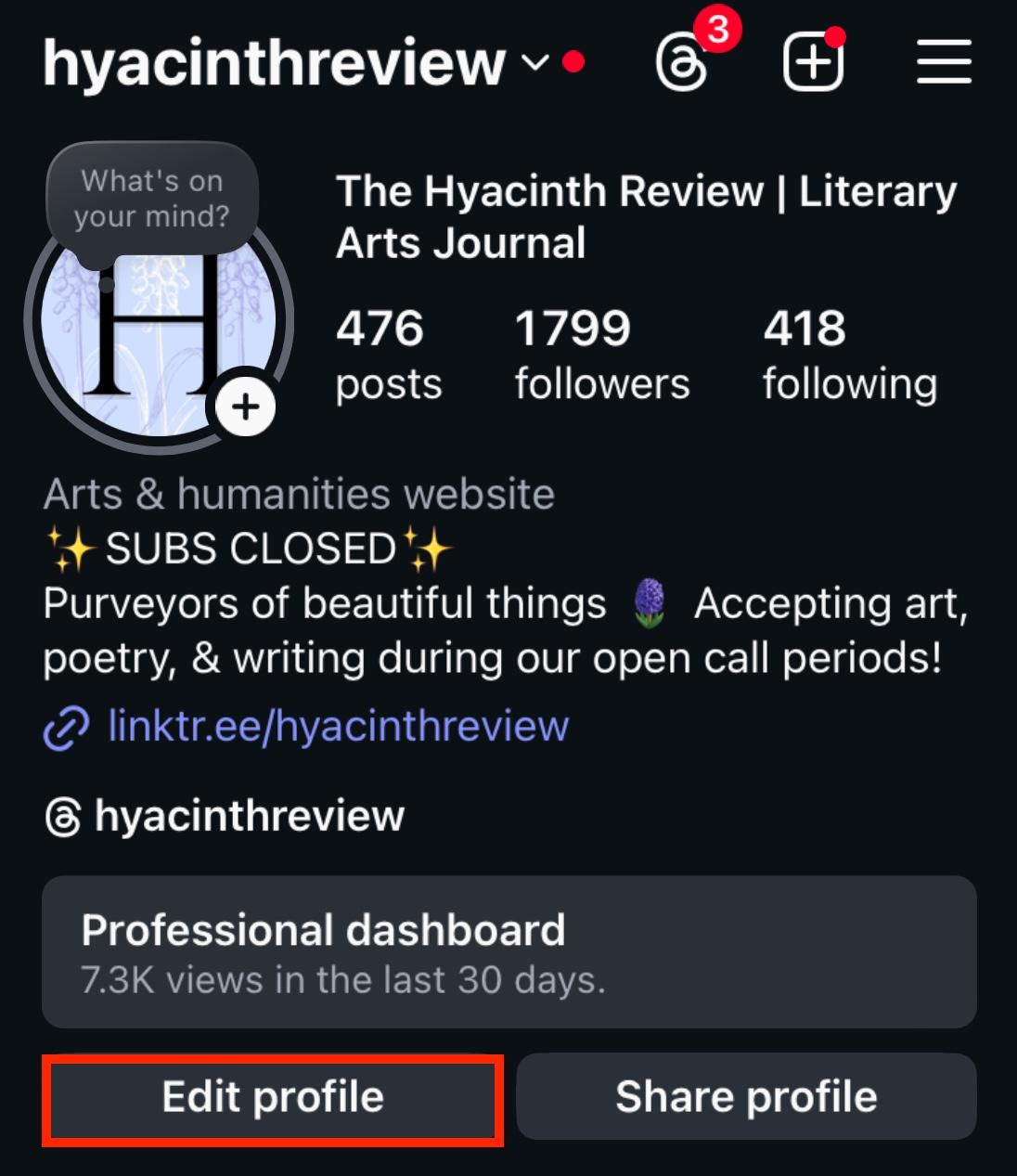
Open your profile page and tap Edit Profile.
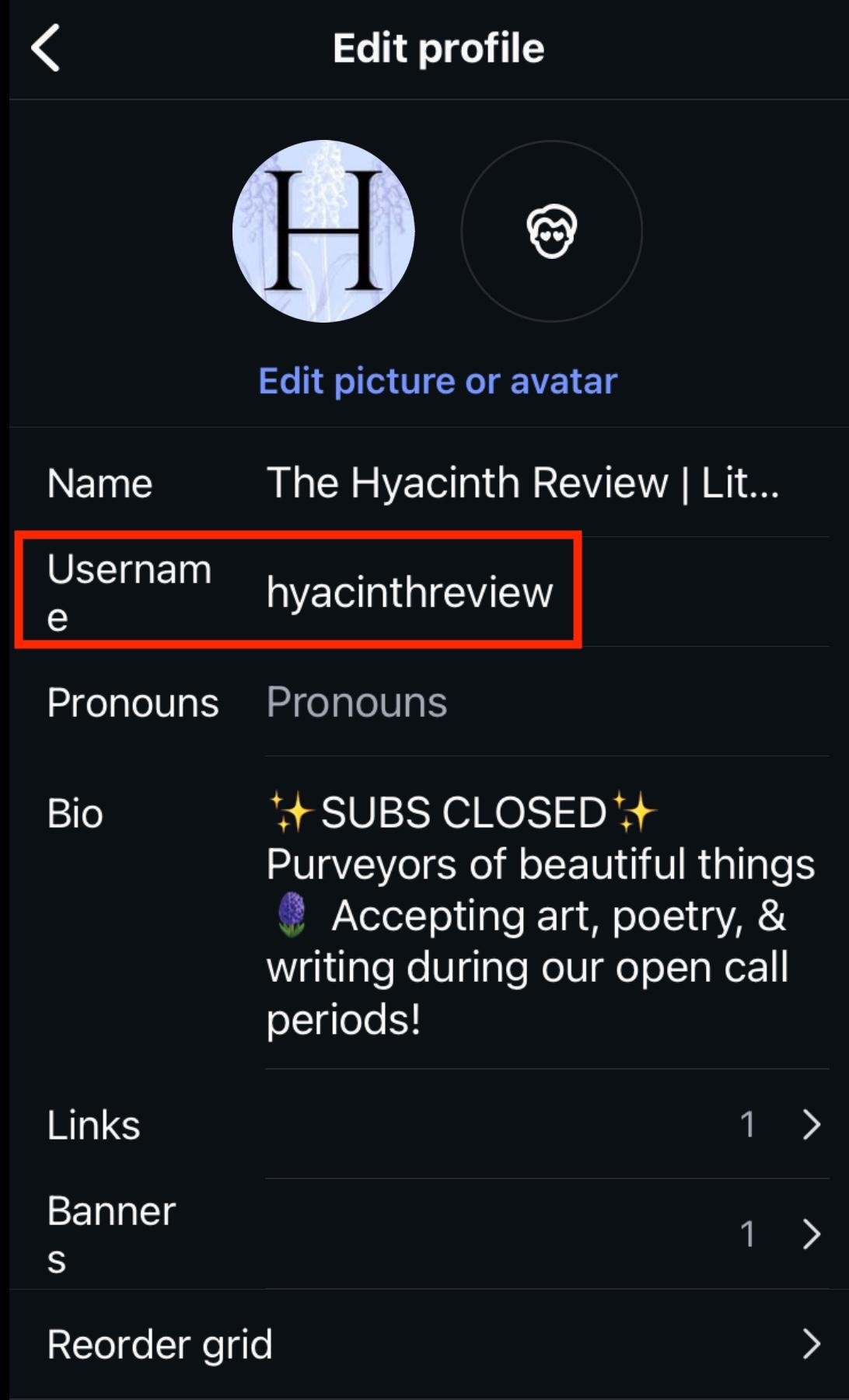
From here, tap Username.
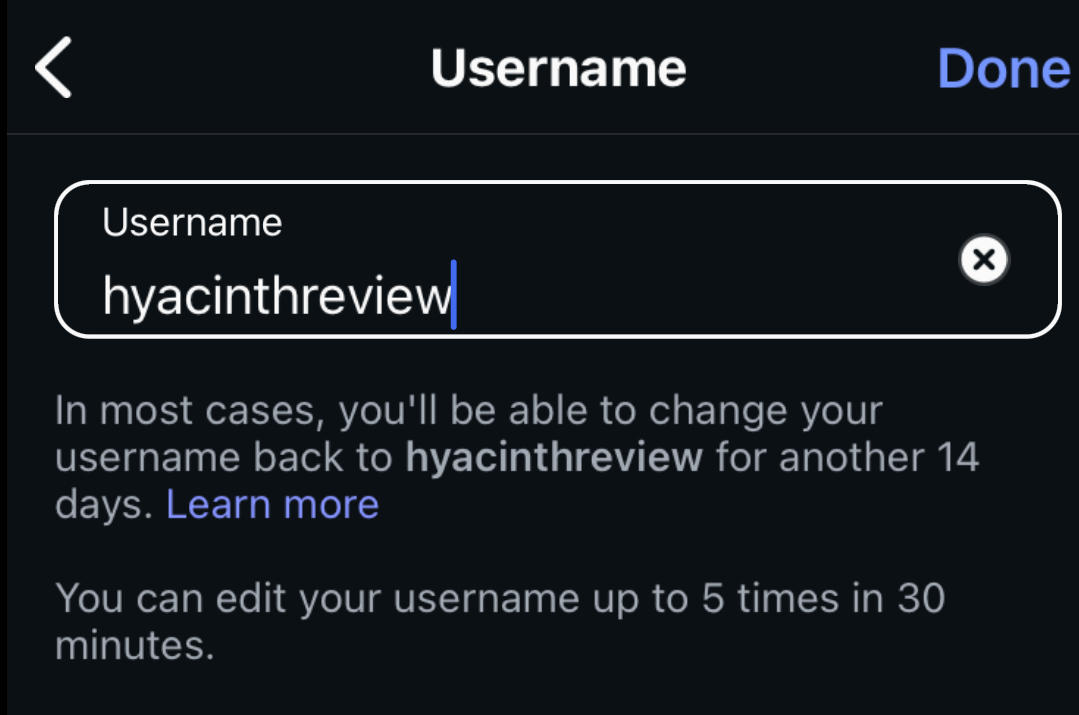
Fill in your new username, then select Done.
On Desktop
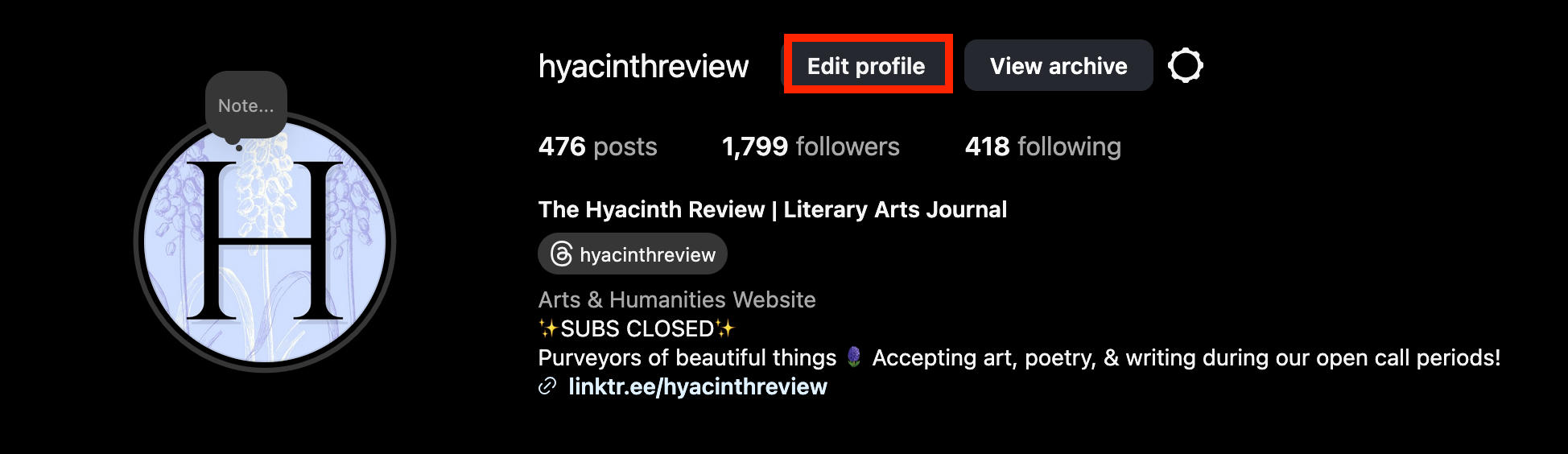
Open your profile page and click Edit Profile.
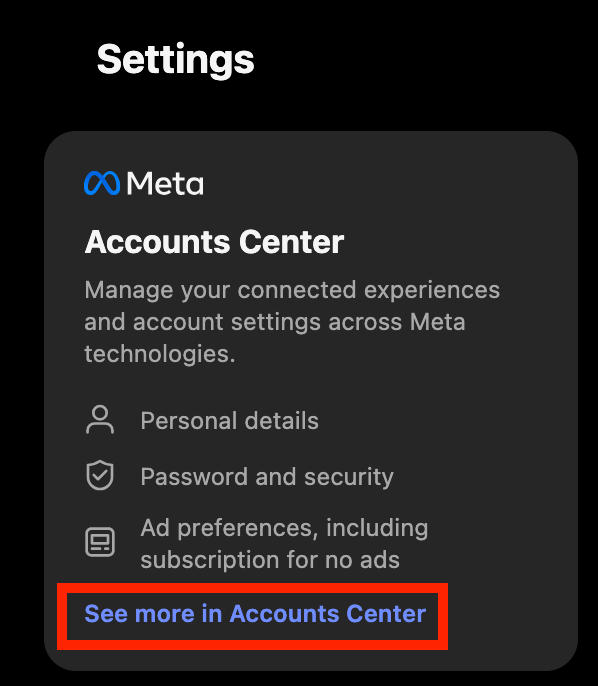
In the left menu under Settings click See More In Accounts Center.
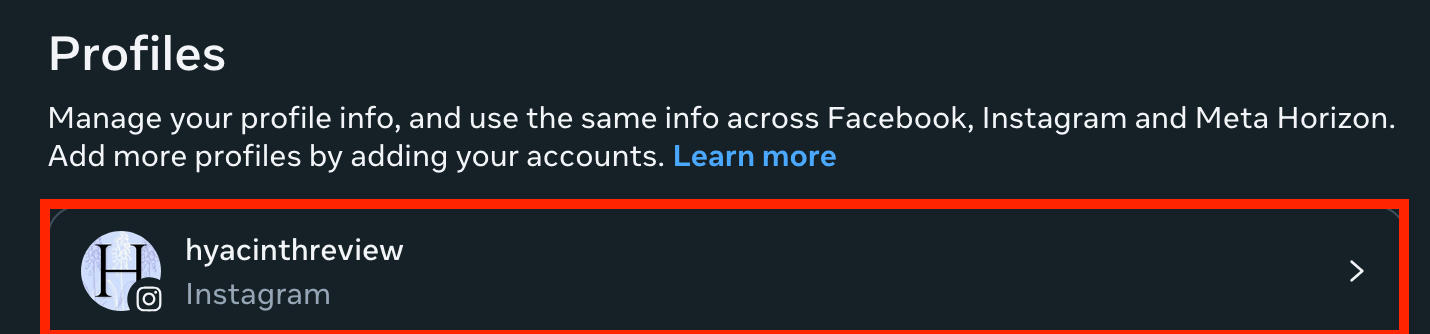
Click your profile.
Click Username.
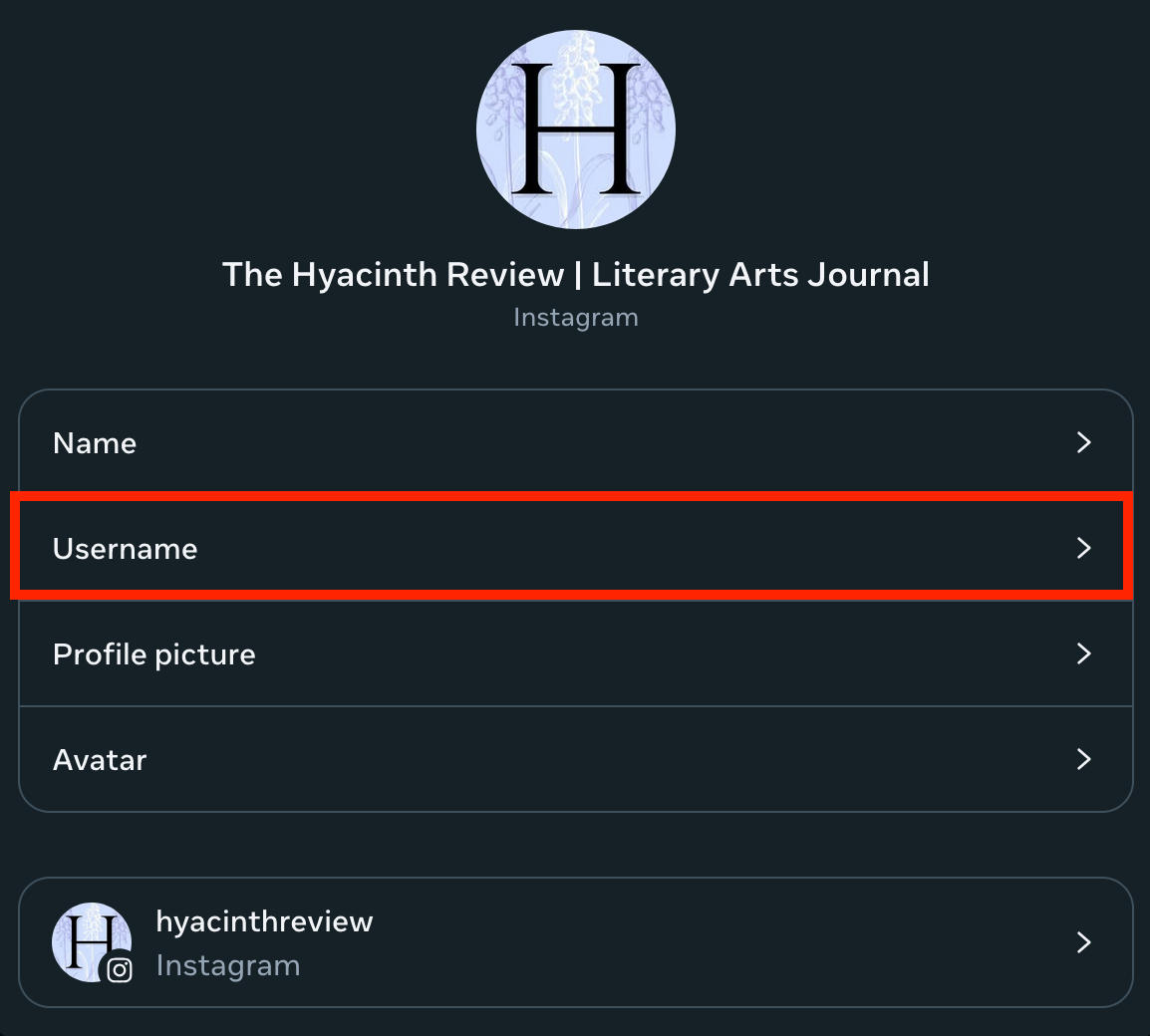
Fill in your new username, then click Done.
Is There A Limit To Changing Your Name On Instagram?
You can change your username as many times as you want in total, but only up to 5 times every 30 minutes.
And don’t worry - Instagram will lock your old username for 14 days, just in case you change your mind and want to revert back to the original one.
Does Changing My Name Affect My Followers?
Instagram will notify your followers of your name change so you don’t have to worry about them being confused.
Just keep in mind that if you have a large following they may also need to review the change to ensure that it complies with their policies.
Can You Change Your First And Last Name On Instagram?
Your display name is separate from your username on Instagram and can be changed at any point.
To change your display name follow the steps outlined here, but select the Name field instead of the Username field.
Troubleshooting: Why Can't I Change My Instagram Name?
Whether you’re receiving an error message or just can’t seem to get your username change to go through, the following troubleshooting steps can help.
Why Can’t I Change My Instagram Name Again?
You can change your Instagram username up to 5 times per 30 minutes. If you’re trying to change it for a 6th time and can’t, just wait 30 minutes and try again.
How Many Days Until You Can Change Your Name On Instagram?
There’s a 30 minute cooldown time for every 5 username changes on Instagram - you don’t have to wait days to be able to change it.
Why Am I Not Able To Change My Nickname In Instagram In Chat?
If the Instagram DM nickname feature isn’t appearing for you, make sure that you’re using a personal account. Professional Instagram accounts don’t have access to this feature.
Why Won’t Instagram Let Me Make A Username For A New Account?
If you’re struggling to create a username for a brand new account, make sure that you’re not using any words that Instagram might consider inappropriate.
Next, search Instagram to see if your username has already been taken. Remember that Instagram saves usernames for inactive or deleted accounts for up to 14 days in case they change their mind.
How Long Do I Have To Wait When Instagram Says Try Again Later?
Instagram’s “try again later” error is temporary, but there’s no set timeframe for how long you have to wait. It could be anywhere from a few minutes, to a few hours, or even days in the case of larger glitches.
Check Instagram’s Downdetector page for any widespread issues.
Do I Have To Wait 14 Days To Change My Name On Instagram?
No, Instagram will simply hold your previous username if you change it, or if you deactivate or delete your account. This is to ensure that it’s not sniped in case you change your mind.
Why Won’t Instagram Let Me Change My Name After 14 Days?
If you’re trying to change your Instagram username back to your old handle after 14 days, chances are someone has already snagged it. Try again with a different username.
How To Make An Impressive Instagram Profile
Your username is just the beginning. A quality Instagram profile should also include an eye-catching profile picture and a bio that says everything your potential followers need to know.
Instagram Profile Picture Tips
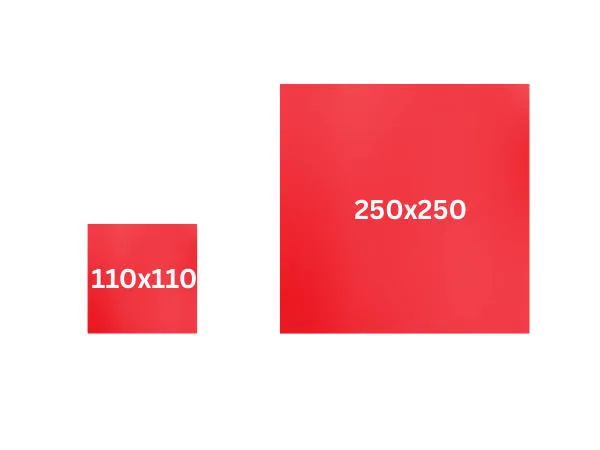 Instagram profile pictures can measure up to 250 x 250 pixels in dimension, but they will be displayed at 110 x 100 pixels as a circle, so make sure your image is still clear even when it's small.
Your profile picture will appear in the following areas:
- The Instagram profile page
- Instagram Stories
- Instagram Highlights (top left corner)
- Instagram post (top left corner)
- Comments (to the right of the username)
- Likes (to the right of the username)
- Direct messages
Instagram Bio Tips
Instagram has a 150 character limit for Instagram bios, including emojis, but you can add as many lines within this character limit as you like.
Check out the following guides on how to format your Instagram bio to help it stand out:
How To Go Viral On IG And Get More Followers
Sure, going viral is about luck - but sometimes giving your profile that extra push can make all the difference.
Here are a few tips to help you get ahead of the curve.
Use Instagram Insights
If you haven’t already, swap account types to a Creator or Business profile. This will unlock Instagram Insights which will allow you to view when your followers are most active, where they’re coming from, and much more.
Learn all about Instagram Insights in our complete guide here.
Create A Posting Schedule
Once you have access to Insights, you can see when your followers are most active. Aim to post during these days and times, plus during a few of the high activity times on Instagram in general.
Buy Instagram Followers
The more followers you have, the more likely your profile and posts are to be recommended to users in the Instagram home feed and Explore pages.
Plus, you need at least 100 Instagram followers to unlock Insights.
Boost your following count fast and buy Instagram followers starting at less than a cent per follower!
Frequently Asked Questions
How to fix Instagram try again later limit?
All you can do is wait. Sometimes it takes a few hours, sometimes longer. Testing it from a different device might help, but usually waiting is your best bet.
Should I clear Instagram's cache?
If you’re dealing with constant bugs, slowness, or glitches, clearing cache can help. On iPhones simply delete the app and reinstall it. For Android devices, go to your Settings > Apps > Instagram then tap Clear Data or Clear Cache.
Does Instagram have a username limit?
Instagram usernames have a 30 character limit.
Can I change my name on Instagram more than twice?
Yes, you can change your Instagram name an unlimited number of times, but only up to 5 times per 30 minutes.
How to change Instagram name 3 times in 14 days?
Instagram allows you to change your username 5 times per 30 minutes, but there’s no major cap on how many times you can change it total.
Fun Fact: If you were to change your username 5 times per 30 minutes, after 14 days you’d have changed it 3,360 times!


