Did you know that you can post anonymously in a Facebook group? You can even comment on someone else’s post without revealing your identity.
This is perfect if you’re sharing content in a local group, or just don’t want everyone to link your name to your posts.
Today you’ll learn how to create anonymous posts and comments on Facebook, how to turn the feature on if you’re a group admin, plus what to do if the feature isn’t appearing on your device or account and how to increase your privacy on the platform.
Key Points:
How Do Anonymous Posts Work?
When you post or comment anonymously in a group, your username and profile photo are hidden from other group members. They will have no way of knowing who published the post or comment.
If anonymous posting and commenting is enabled, you will also have to ability to react anonymously to other people’s posts.
Can admins still see who posted anonymously?
Yes, group admins do have the ability to see the identity of anonymous users, but generally if this option is enabled they won’t divulge your identity.
However, this depends on the specific group and the individuals in charge, so it’s best to only post content that you’re comfortable sharing with group admins.
Do anonymous posts on Facebook have to be approved?
That depends on the group. Group admins have the ability to require manual approval for anonymous posts and comments, but not every group will require it.
Some anonymous posts may require admin approval, but otherwise they should publish immediately. If the group you’re posting in requires approval, you’ll be notified upon publishing your post.
Are Anonymous Posts Really Untraceable?
When you post anonymously in a Facebook group you have the option to post, comment, or reply anonymously and the ability to set a customized nickname.
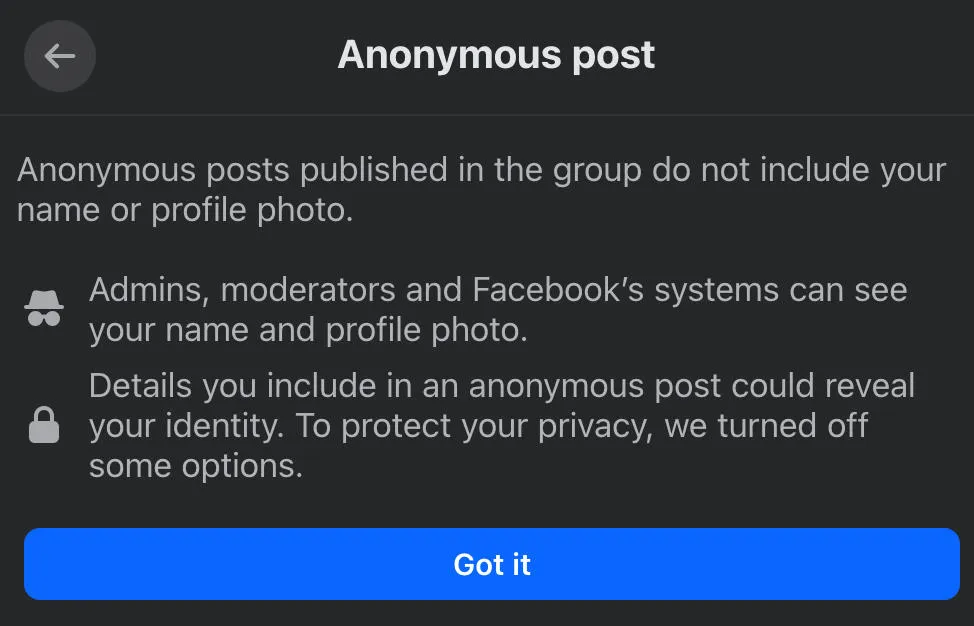
However, even if you choose to engage anonymously, your name and photo will still be visible to Facebook and any group admin or moderators.
How Do I Post Anonymously On Facebook?
To create an anonymous post, open the post creator on the group of your choice by clicking Write something…
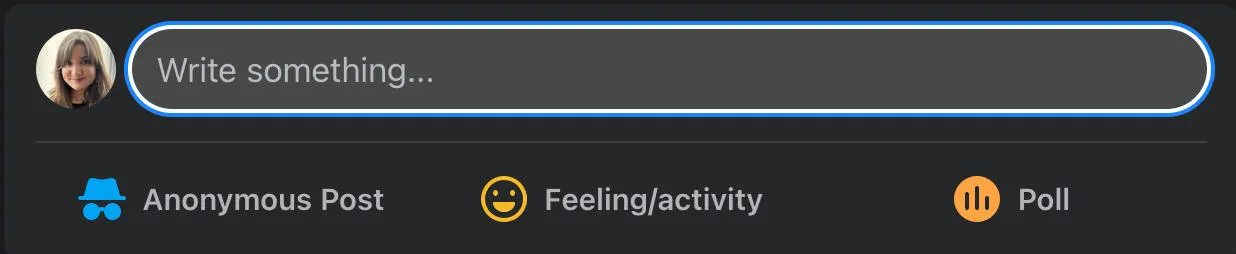
From here, you should see a toggle next to Post Anonymously, then confirm your choice by clicking Got It.
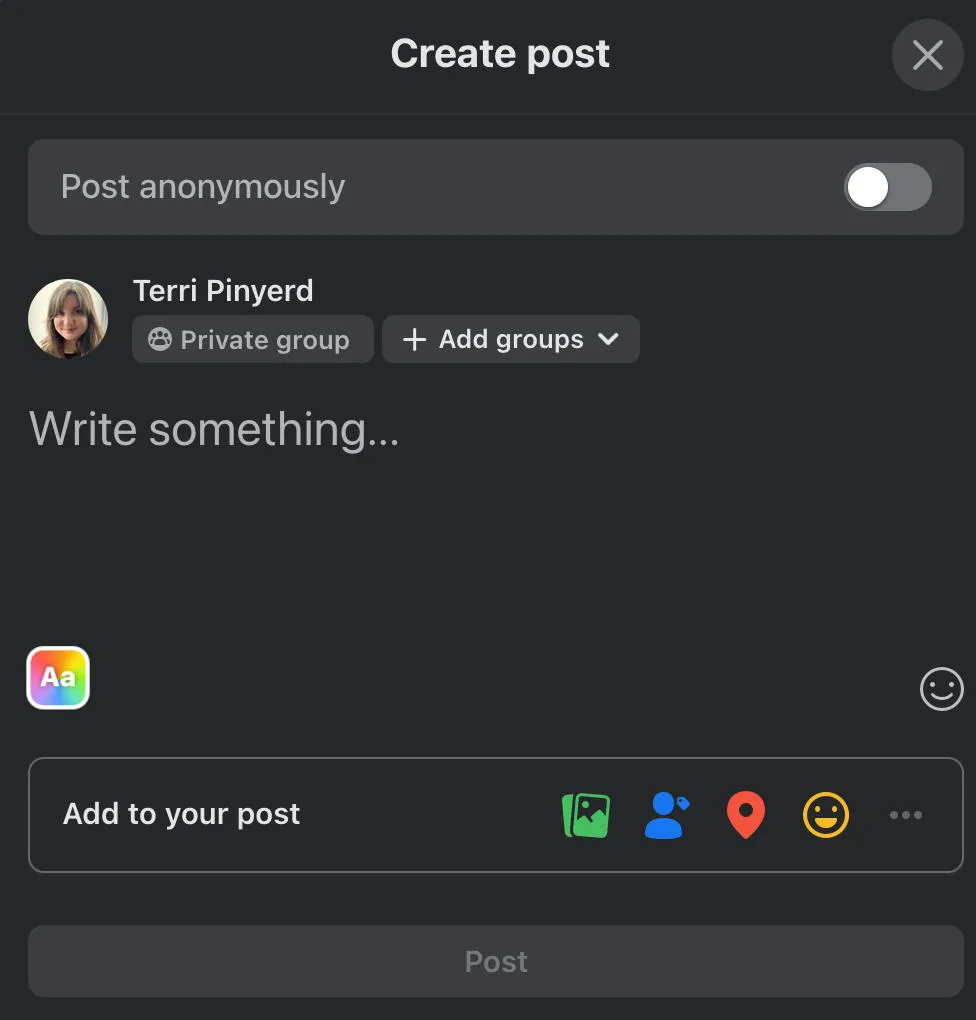
If you’re on the Facebook app you will have the ability to create a custom nickname. If this is available, you’ll have the ability to tap Create Custom Nickname during the creation process.
Write and publish your post as usual. When it’s published, you’ll see Anonymous User in place of your display name, and the default profile picture in place of your own photo.
How Do I Comment Anonymously On Facebook?
If you want to comment on a post to offer anonymous feedback, you can comment anonymously as long as the feature is available to your group and to you.
As with posts, you will only be able to do this if the following conditions are met:
-
The group has anonymous participation available to it
-
The group admin have enabled anonymous participation
-
Your account and/or device allows anonymous participation
When you comment anonymously on a post, your comment will appear as being published by Anonymous Participant (in a public group), Anonymous Member (in a private group), or as the nickname you set if the feature was available to you. Your profile picture will be replaced with the anonymous member icon.
On Mobile
Tap the timestamp on the post to open the group post you wish to comment on. You’ll need to have the specific post open as its own page - you won’t be able to comment anonymously from the group feed.
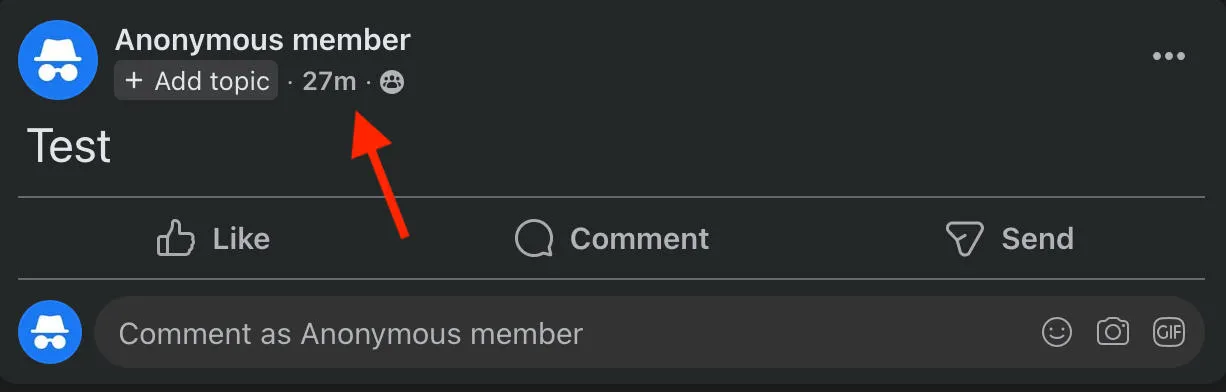
Tap Comment.
Tap your profile next to the Write A Comment box.
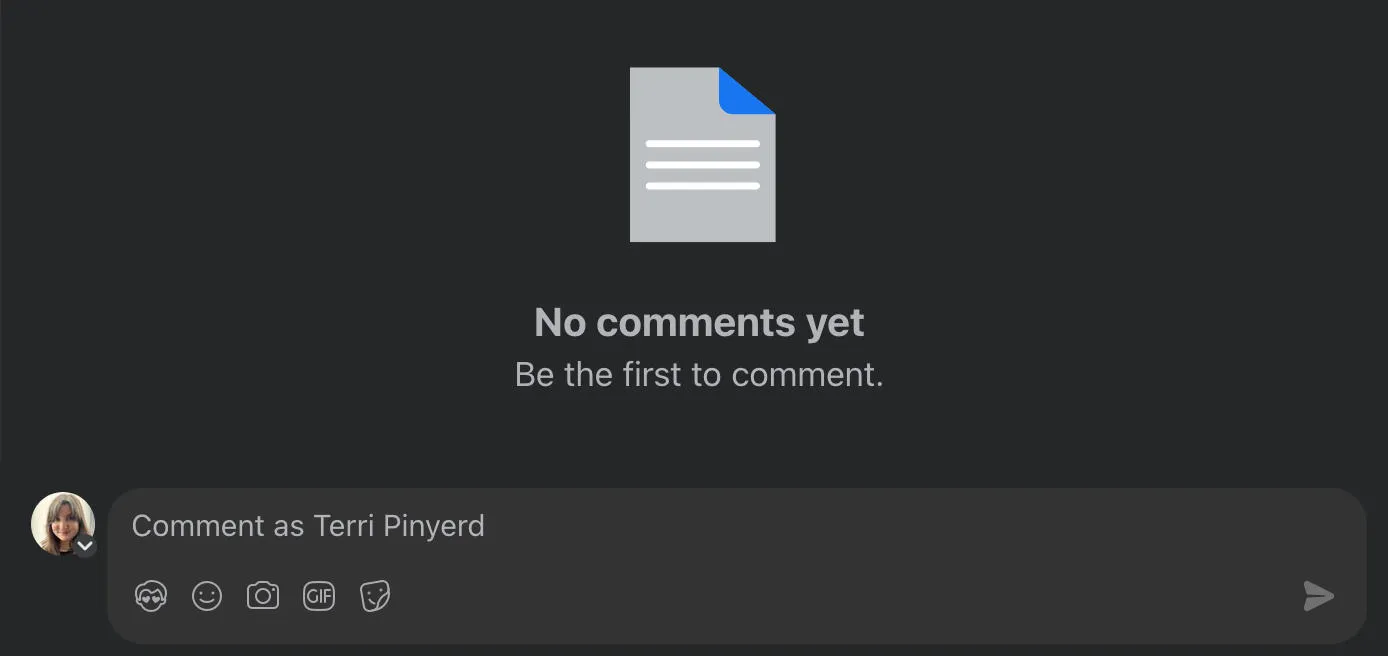
Select Anonymous or the nickname you set for yourself.
Write your comment as usual and submit it.
On Desktop
Click the timestamp on the post to open the group post you wish to comment on. You’ll need to have the specific post open as its own page - you won’t be able to comment anonymously from the group feed.
Next to Comment As… click the small arrow on your profile picture.
Select who you want to comment as then write your comment and submit it as usual.
Can I Reply To A Comment Anonymously?
Yes you can! To do this, tap the timestamp on a post to make sure you’re viewing it from its own page.
Then, tap or click Reply beneath a comment.
Tap or click the arrow on your profile picture then select who you want to comment as.
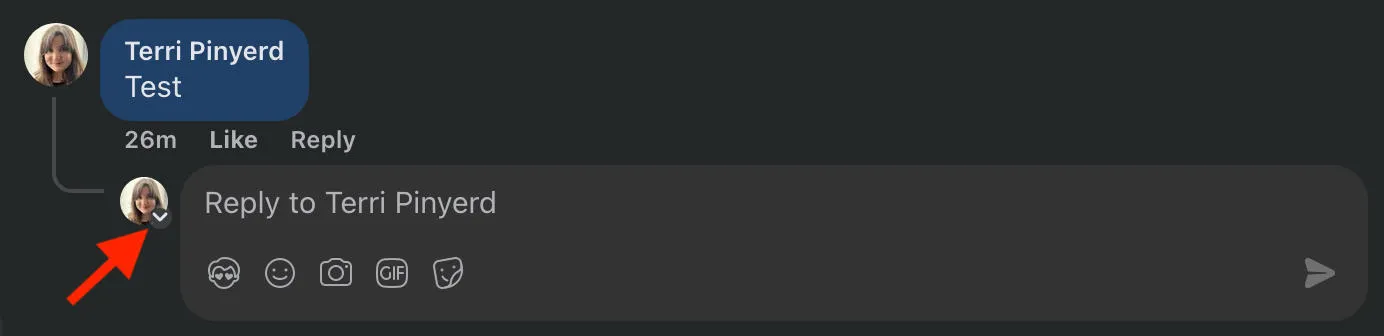
Write your reply and submit as usual!
Can Facebook Comments Be Truly Anonymous?
Just like regular posts and replies, these comments appear as anonymous to the majority of the group’s members but Facebook and the group’s moderators and admin can see the identity of anonymous commenters.
Currently there is no way to post a comment on Facebook that is 100% anonymous with your identity hidden from everyone.
Can You Set Facebook Comments To Private?
While you can’t set comments to private specifically, you can hide them from a Facebook page. Hiding a comment will hide it from anyone who is not the comment poster or friends with the comment poster. Replies to the hidden comment will also be hidden.
How To Hide A Comment
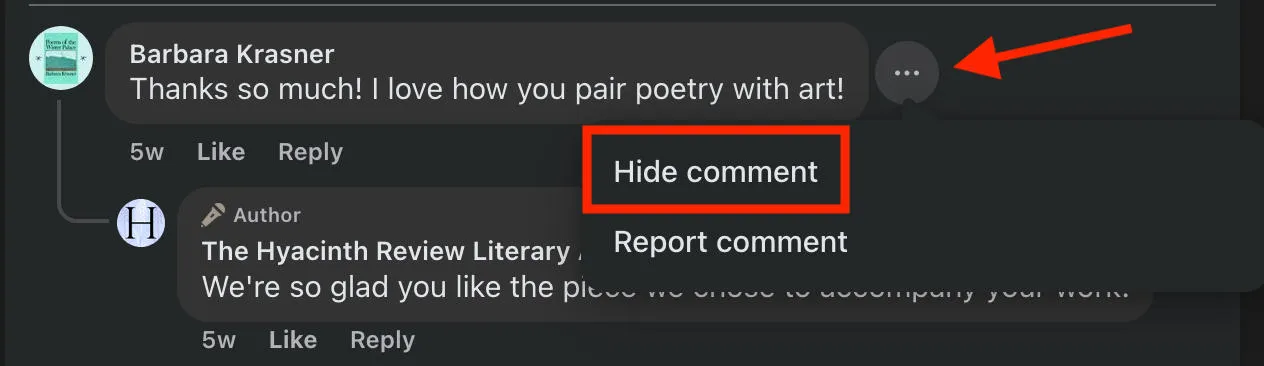
To hide a comment, open the post that has the offending comment.
Click the three dots to the right and select Hide Comment.
How To Unhide A Comment
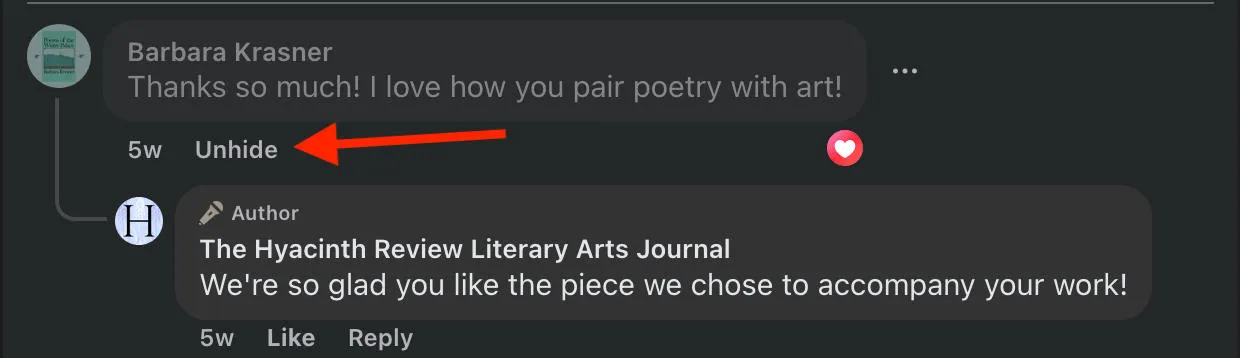
If you want to unhide a comment, go back to the post that has the hidden comment.
At the top of the post, click Most Relevant and choose Hidden By This Page.
Beneath the post, click Unhide.
Is Hiding Better Than Deleting Comments?
When you delete a comment, it’s permanently deleted and cannot be restored or recovered in any way. Deleting will also be noticeable to the original poster of the comment, and anyone who replied to it.
On the other hand, hiding a comment is reversible and the original poster will not notice that their comment has been hidden since both they and their friends will still be able to see it.
Users whose comments have been hidden will not be notified.
How To Tell If Someone Hides Your Comments
Since Facebook doesn’t notify users when their comments are hidden, it might not be immediately obvious if a Page admin has hidden your own comments.
The best way to test this out is to view the post while logged out, or from a different account that is not friends with the account you used to post the comment.
If you can’t see your comment while logged out, it’s likely that your comment was hidden.
How Do I React Anonymously On Facebook?
To react anonymously to group posts, you’ll have to swap to the anonymous profile you use to create posts and comments.
To do this, go to the post you want to react on and tap your profile picture next to Write A Comment….
From here, select who you want to participate as, then react to the post. You reaction will not be tied to your default display name or profile picture.
How Do I Turn On Anonymous Post Approval On Facebook?
If you’re a group owner or admin, you can toggle anonymous posting on or off, and you can require approval for anonymous posts.
Turning On Anonymous Posting
On the left menu, click Group Settings.
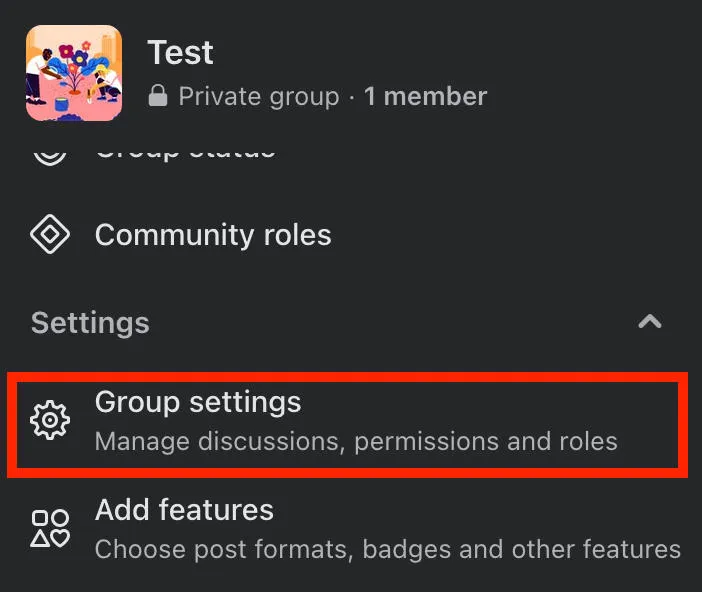
Below Manage Discussion, click Edit next to Anonymous Posting.
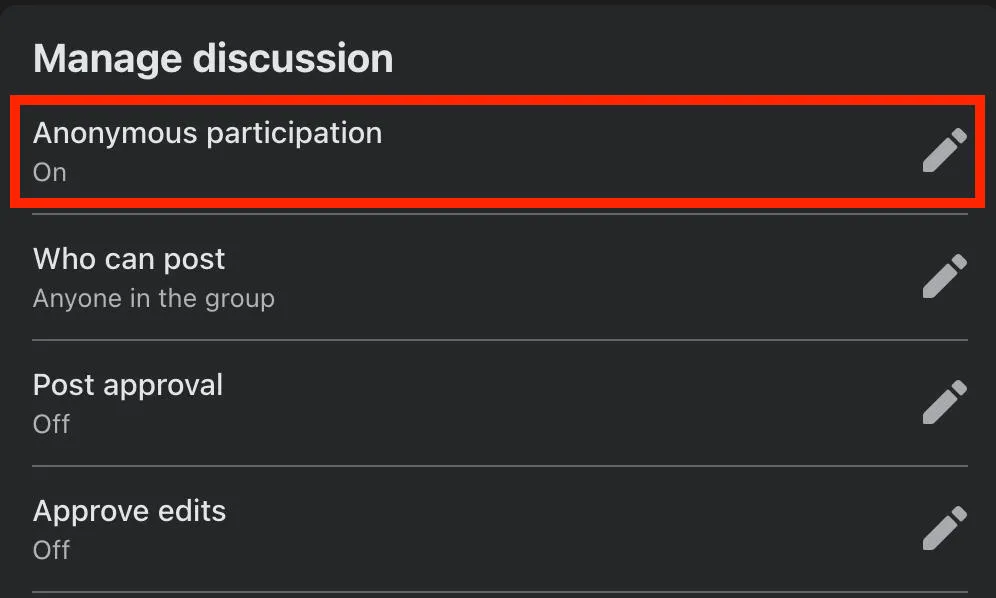
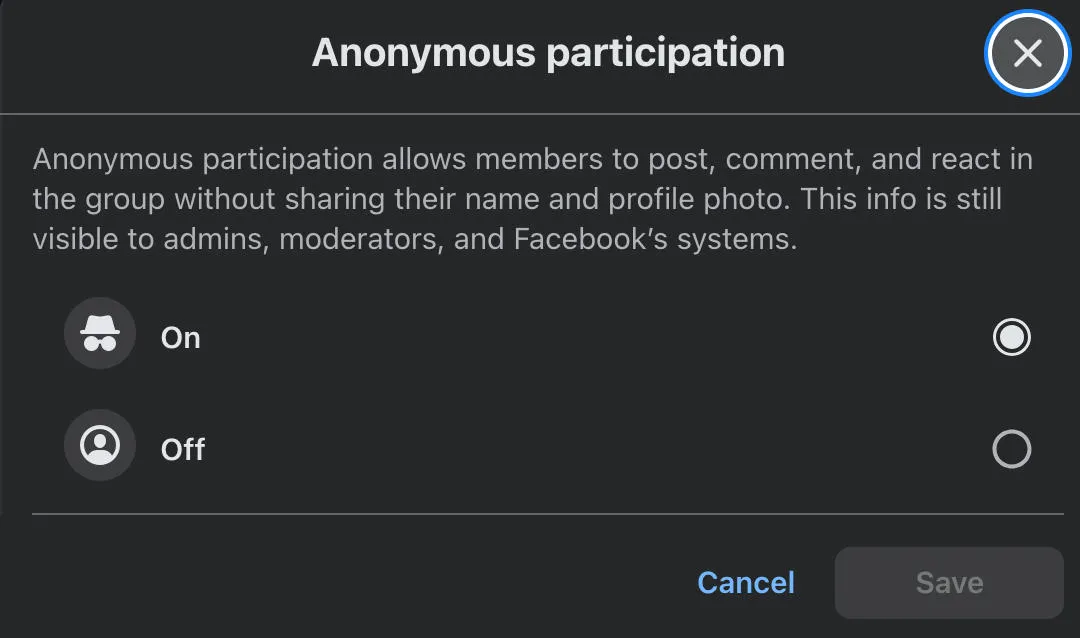
Toggle Anonymous Participation to ON, then save your changes.
Turning On Anonymous Post Approval
Once anonymous posting is on, you can decide whether or not you want to require admin approval for them.
On the left menu, click Group Settings.
Below Manage Discussion, click the pencil icon next to Approval.
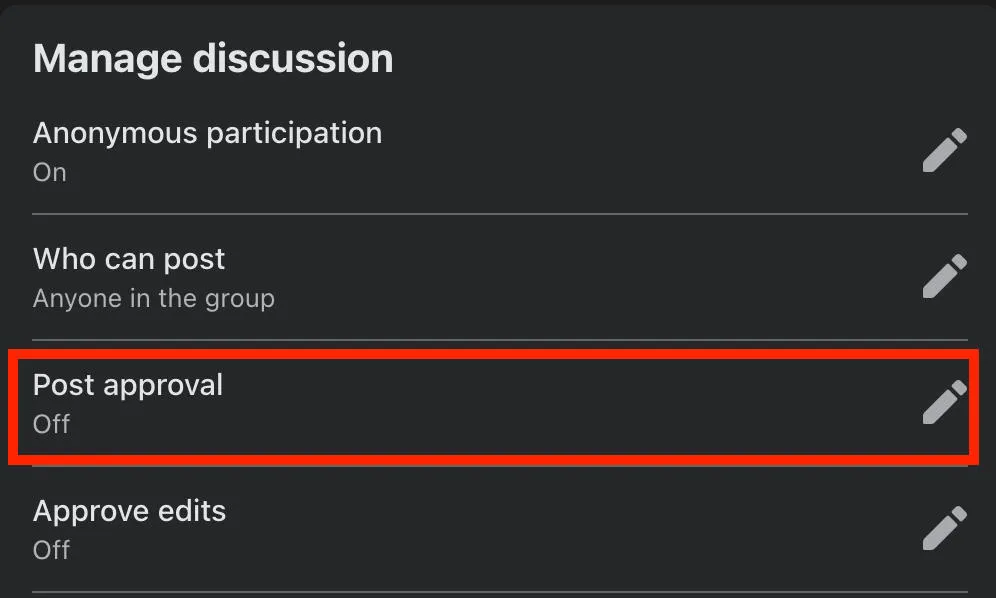
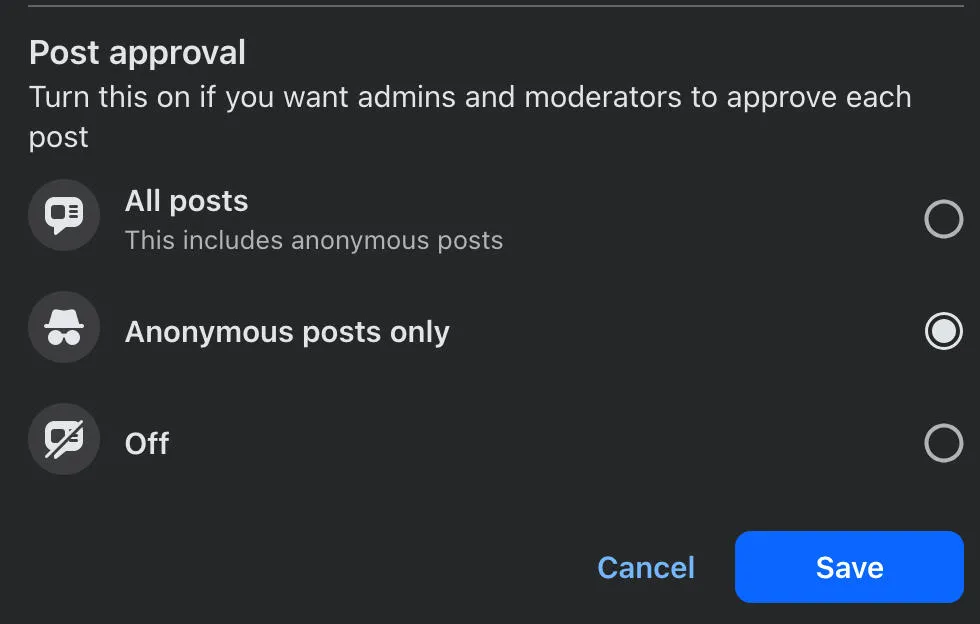
Toggle either All Posts or Anonymous Posts Only to ON. If you already require approval for general posts, this will be toggled on by default.
What Should You Avoid When Posting Anonymously?
Anonymous posting is available for users who don’t want to have their group activity tied to their personal accounts, but that doesn’t mean you should post just anything.
Remember that group admin, moderators, and Facebook itself can still see the identity behind the anonymous post so don’t share anything you wouldn’t want them to associate with your personal profile.
You should also avoid sharing sensitive personal information, like contact info, addresses, trade secrets, login information, and of course anything that violates Facebook’s terms of service.
What Are The Risks Of Anonymous Posts?
Because group admin and moderators can still see your identity, if you post something that goes against group rules of Facebook’s Community Guidelines, you still run the risk of being banned or suspended from the group. Depending on the severity of the violation, you could even have your Facebook account shut down.
On a less serious note, other users may be hesitant to engage with anonymous posters or commenters since they can’t tell who is behind the account.
Why Can't I Post Anonymously On Facebook When Others Can?
If you’re seeing other users in your group posting or commenting anonymously, but you don’t have the ability, it could be due to your device type.
Many desktop users may find that they’re unable to publish anonymous posts from their browser, but they do have the ability to do so from the Facebook app, so try this first.
If you’re not seeing the ability on any device type, it could be because the feature isn’t available to you yet, usually due to a region restriction.
Why Can't I Comment Anonymously On Facebook But Others Can?
If you’re seeing that other users are commenting anonymously on posts within a Facebook group but you can’t do the same, first make sure you’re viewing the post from its own page.
To do this, tap or click the post’s timestamp:
Once you’re on the post’s page you should see the arrow on your profile picture that allows you to swap into anonymous mode.
If you still don’t see it, it could be due to your device type. The Facebook app usually has fewer issues with anonymous posting, so if you’re struggling to find the feature on desktop try using your phone first.
If you don’t have the ability to post anonymously on mobile or desktop, the feature might not be available to your specific account yet, most likely to due a region restriction.
How Do I Prevent People From Finding Me On Facebook?
There are a few additional things you can do on your main profile to ensure your information as private as possible, including changing your profile privacy, adjusting how other users can find and contact you, adjusting your tagging permissions, and blocking users that you don’t want to interact with.
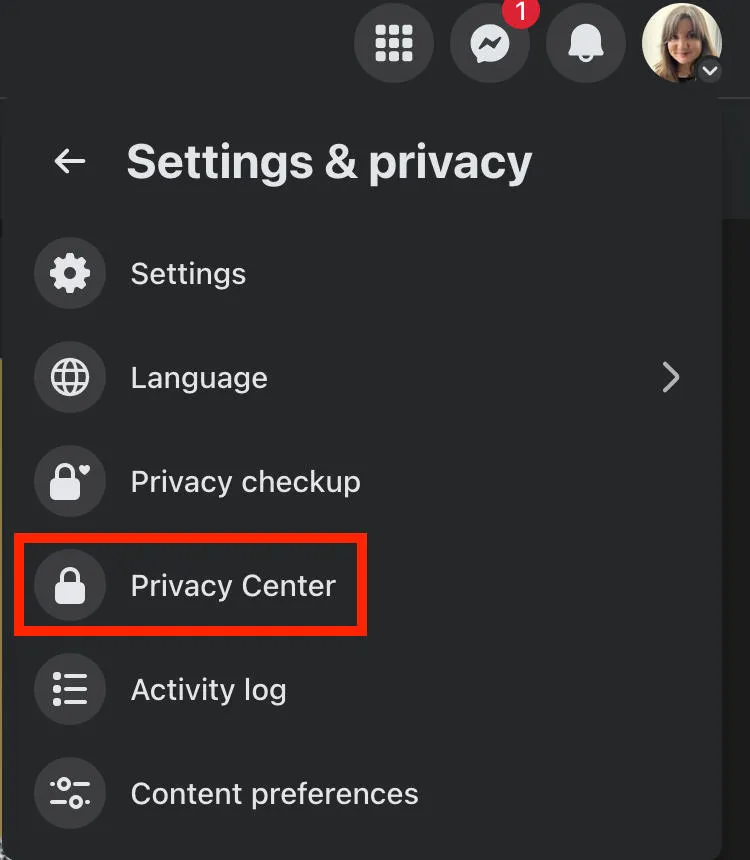
To get started, visit Facebook’s Privacy Center by clicking your profile picture on the top right corner, then clicking Settings & Privacy > Privacy Center.
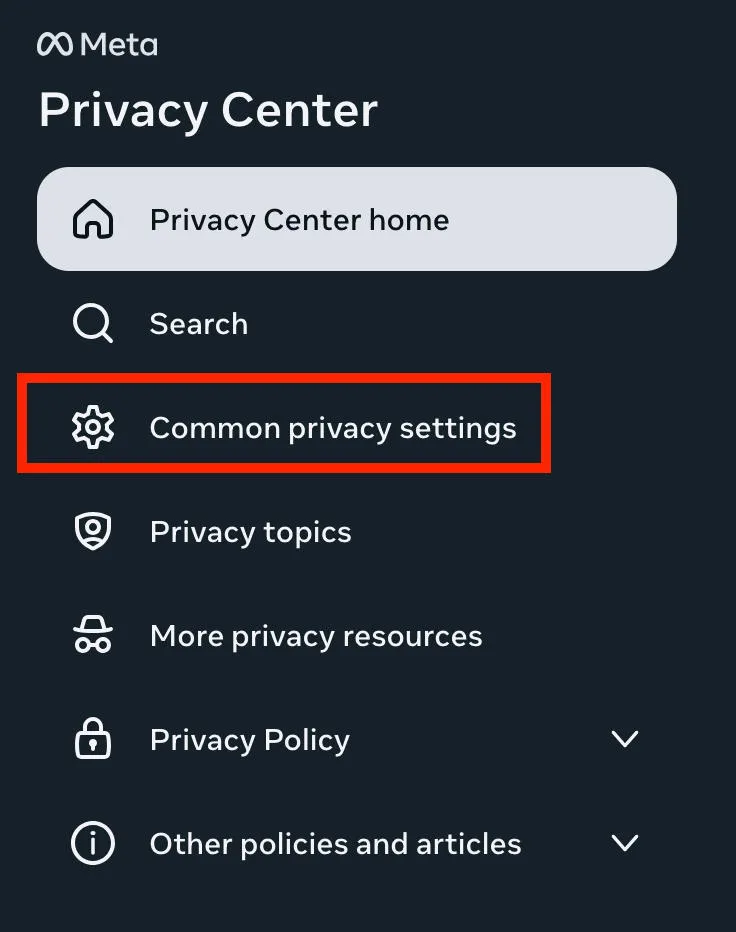
From the left menu, click Common Privacy Settings.
How To Change Your Profile Privacy Settings
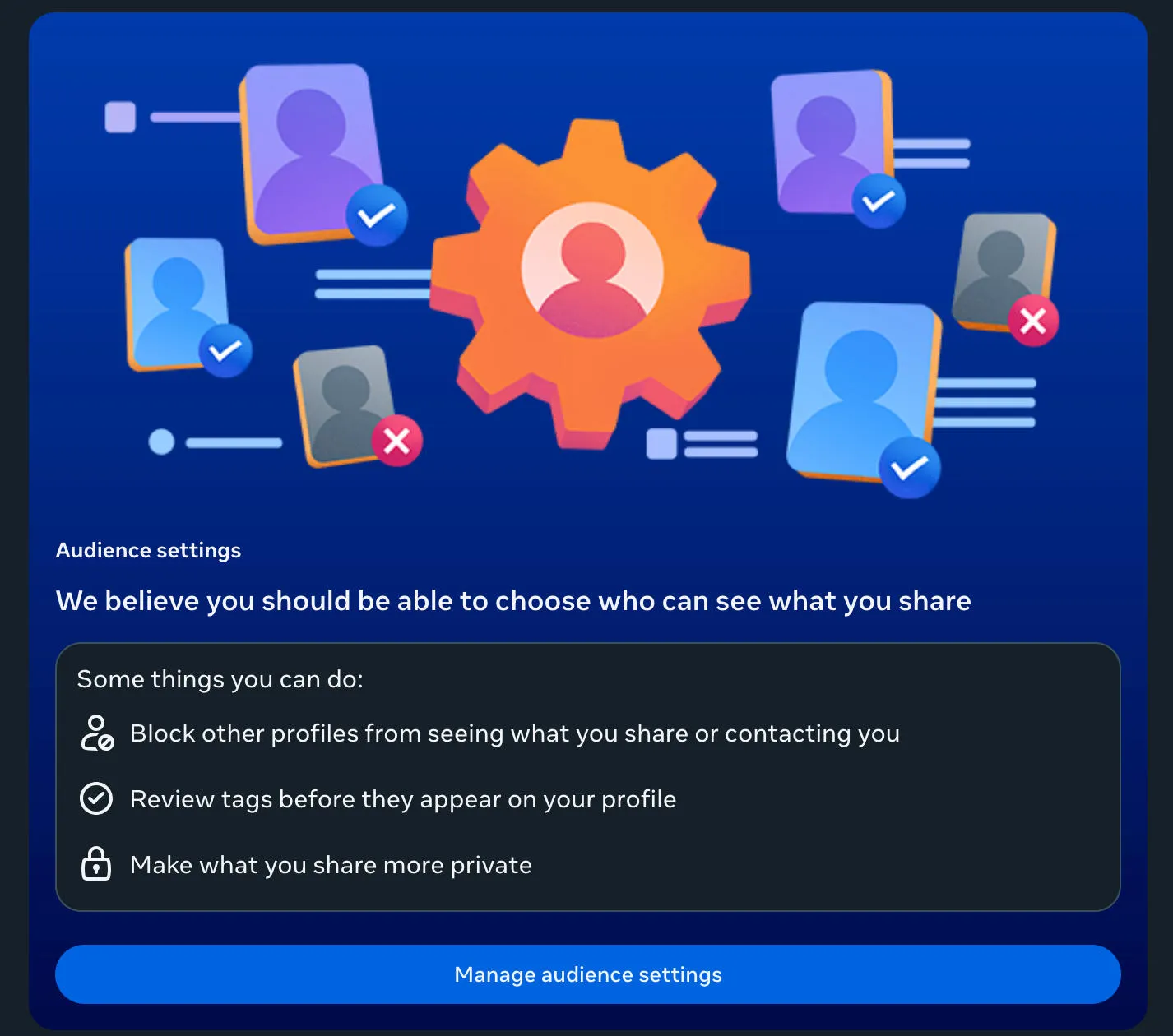
From the privacy center, scroll down to Audience Settings and click Manage Audience Settings.
From here, you can adjust the audience for your profile information and for your posts and stories.
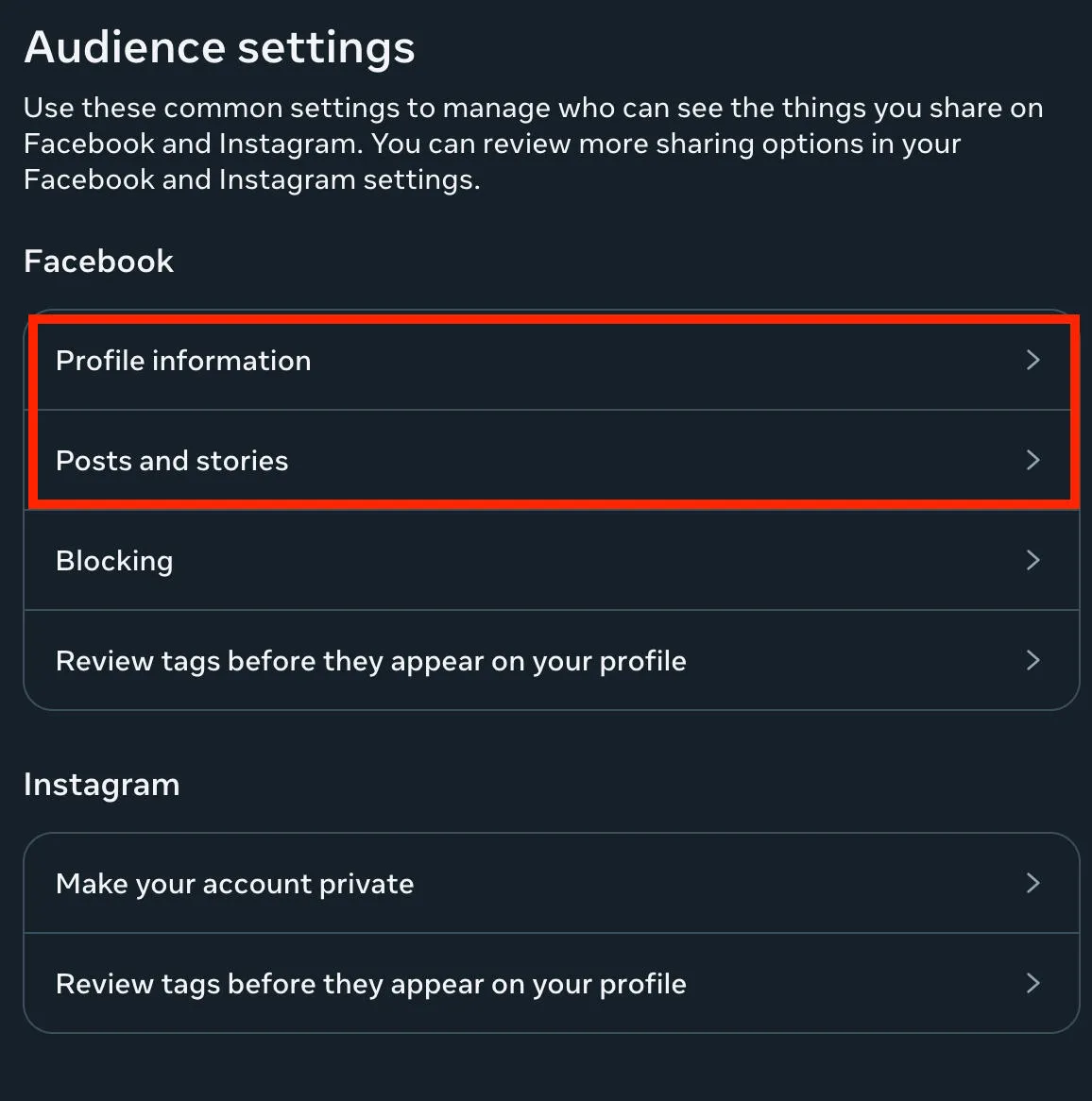
Set these to either Friends or Only Me for maximum privacy.
How To Adjust Who Can Add You
From Facebook’s privacy settings page, click Who Can Send You Friend Requests? and change it to Friends of Friends.
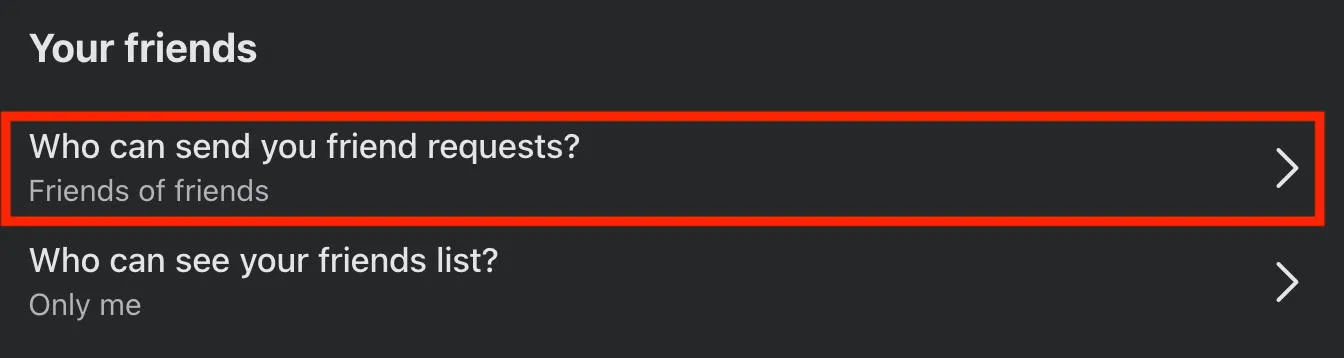
This will ensure that only mutual friends within your existing social circle can add you. If someone outside of this circle wants to add you as a friend, you will have to add them instead.
How To Turn Off Search Engine Linking
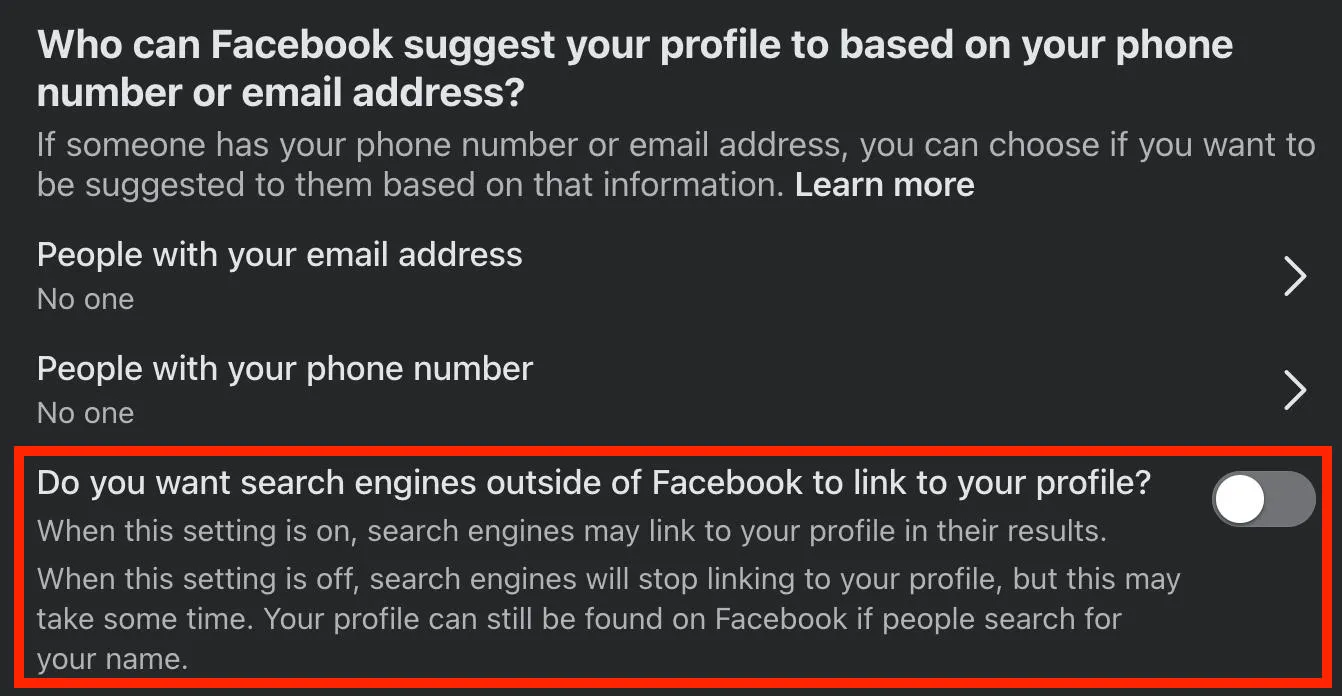
If you don’t want your profile to appear on search engines when someone Googles your name, you can turn off search engine linking by visiting Facebook’s privacy page here, then toggling Do you want search engines outside of Facebook to link to your profile? to OFF.
How To Change Tagging Permissions
From the privacy center, scroll down to Audience Settings and click Manage Audience Settings.
Click Review tags before they appear on your profile, then toggle it to ON and save your changes.
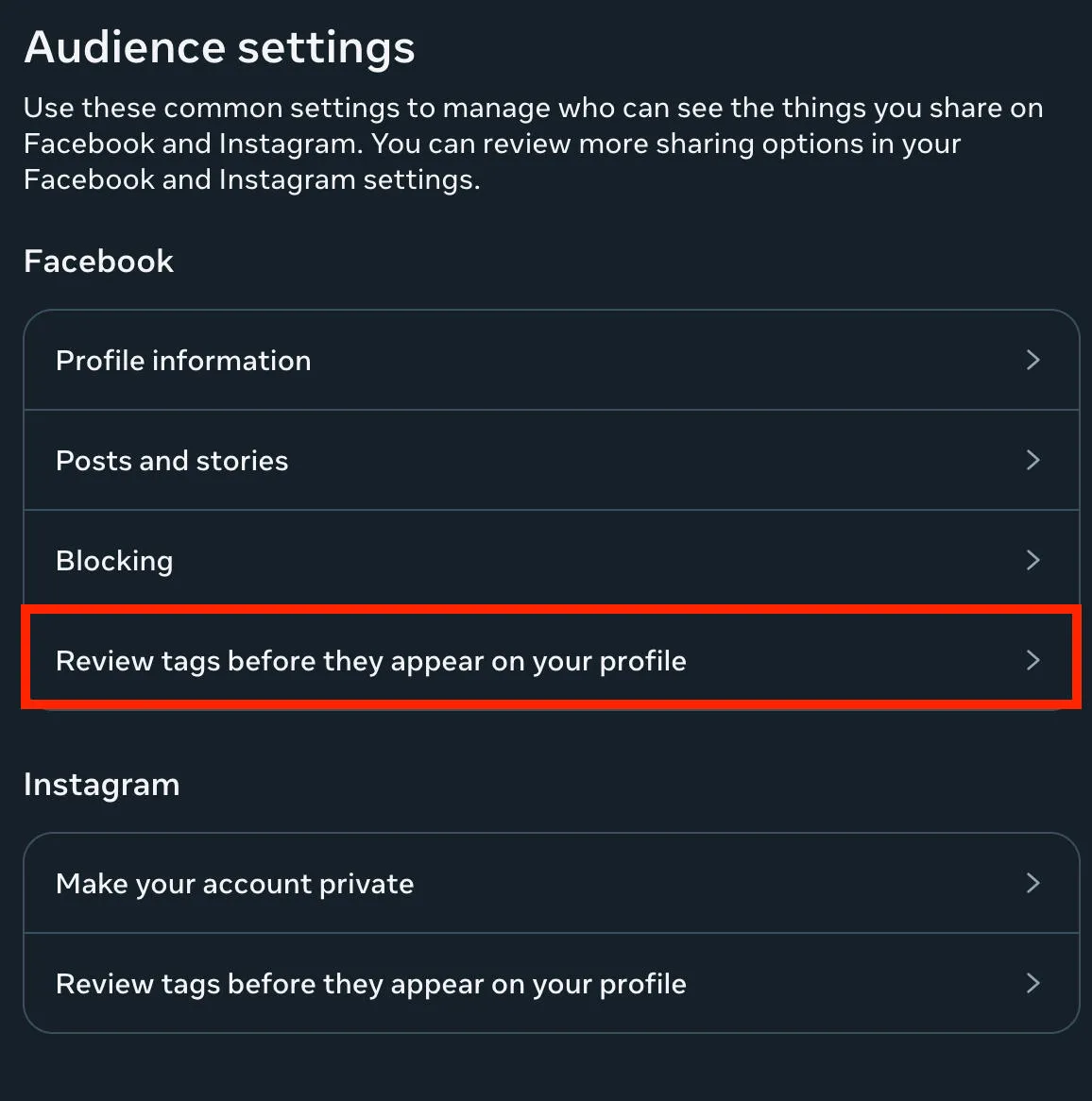
Now, when a user tags you in a post you will have the ability to approve or deny the tag before it’s linked to your profile.
How To Block Users
From the privacy center, scroll down to Audience Settings and click Manage Audience Settings.
Click Blocking.
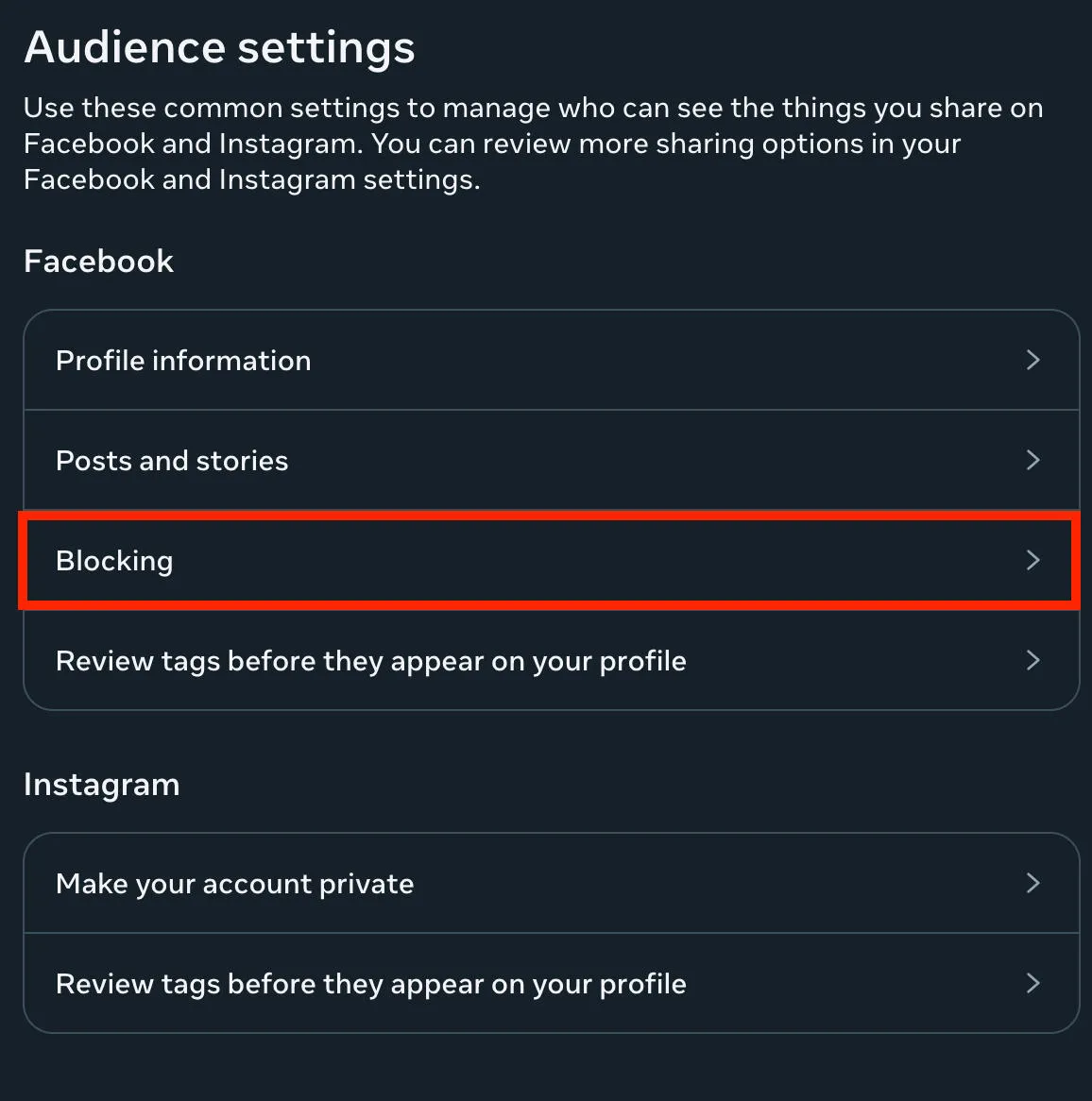
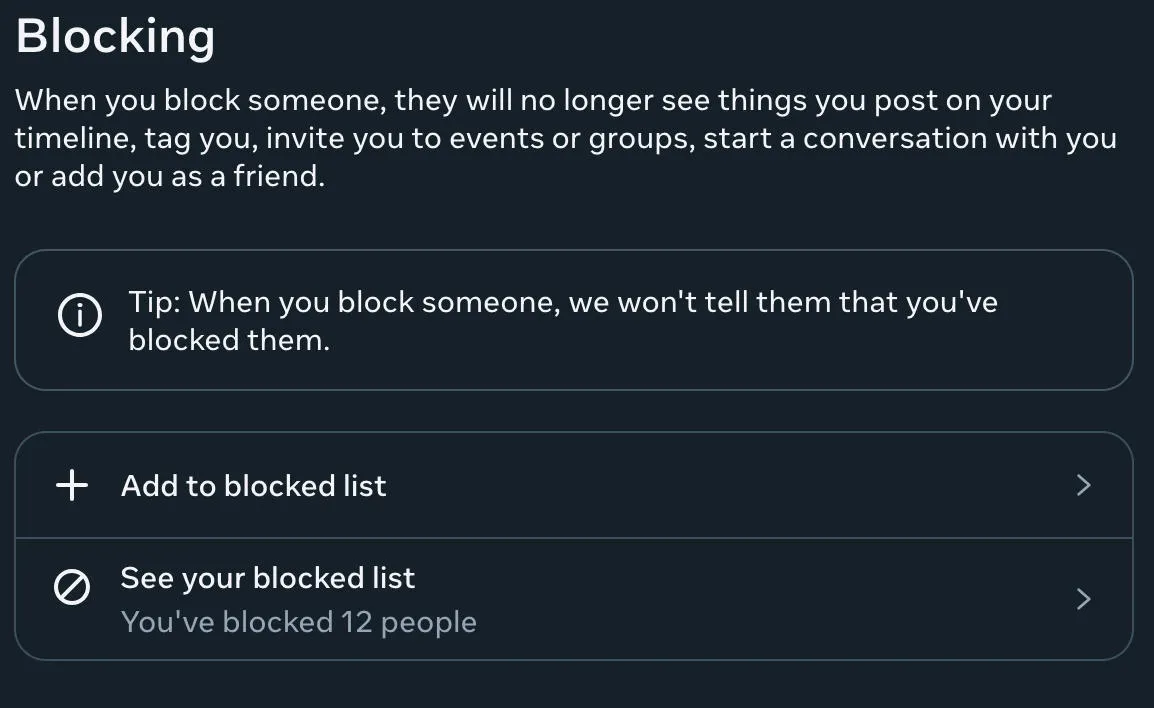
From here you can manage existing blocked users, or search for another user to add to the list.
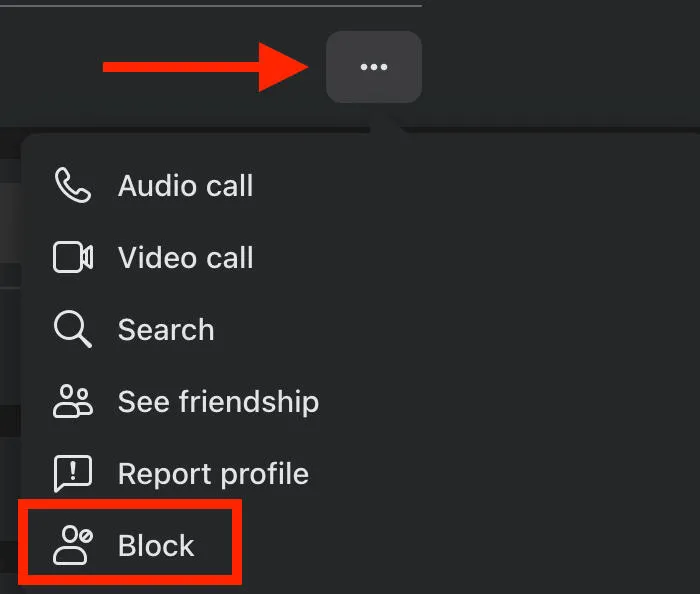
Alternatively, you can block a user directly from their profile page by clicking the three dots on the bottom right of their profile menu and selecting Block.
Frequently Asked Questions
Is an anonymous post on FB really anonymous?
An anonymous post won’t share your display name or profile picture with other group members, but admin and moderators will see be able to see who is behind a specific post if they view their moderation settings.
When did Facebook start allowing anonymous posts?
Facebook released the anonymous posting feature for all users in 2021.
Why can't I post anonymously on Facebook 2025?
Either the group doesn’t allow anonymous posting, your account doesn’t have the feature available, or you’re posting from a device that doesn’t support it. If you see other users posting or commenting anonymously in the group, try posting from your Facebook app rather than the desktop site.
Why don't I have the anonymous post option on Facebook?
Not every group has the anonymous post option toggled on, and not every user has access to the feature. You might also need to try posting from the Facebook app.
Will I ever be able to post anonymously on Facebook?
Only if the group admin allows it!
Are anonymous posts really private?
Anonymous posts are private to the rest of the group, but admin and mods can see the display name and profile picture of anonymous users so don’t post anything you wouldn’t want them to link to your real name.
How to make your Facebook unsearchable in 2025?
You can turn off the ability for search engines to list your profile page via your privacy settings. Learn how to toggle it off here.
How to comment anonymously on Facebook 2025?
You can comment anonymously on a group post while viewing the post from its own page. Once you’re there, tap or click the arrow icon that appears on your profile picture.
Why can't I comment on some people's Facebook?
If you’re trying to comment on a specific user’s posts, they may have blocked or restricted you. If you’re trying to post on a group or page, it could be due to post approval settings.
How to comment on Facebook without friends seeing?
The best way to comment without anyone else knowing it’s you is to comment anonymously on a Facebook group. Keep in mind that this feature is only available for groups, not profiles or Pages, and it will only appear as an option if the group qualifies, has anonymous participation enabled, and your account/device type support it.
Can you comment anonymously on Facebook on iphone?
Yes, you can comment anonymously in Facebook groups from both iPhone and desktop devices. Just make sure that you’re viewing the post from its own page by tapping the timestamp.
Can you comment anonymously on Facebook mobile?
Yes, as long as your account and the group has anonymous participation enabled you can comment anonymously from the Facebook mobile app.
How to comment anonymously on Facebook group on phone?
To comment anonymously on a mobile device, tap the post’s timestamp to open the full page. Then tap the arrow on your profile picture near the comment box to swap into an anonymous profile.
How to comment anonymously on Facebook groups on PC?
To comment anonymously on a desktop computer, tap the post’s timestamp to open the full page. From here, click the arrow on your profile picture near the comment box to swap into an anonymous profile.
How to reply to a comment anonymously on Facebook?
You’ll need to be viewing the post from its own page first, so tap or click the timestamp on the post. Then, click Reply beneath the comment and select the arrow on your profile picture to swap into an anonymous profile.
Why can't I comment anonymously on Facebook?
First, you need to be viewing the post from its own page so tap or click the timestamp on the post to open it up individually. You won’t be able to interact anonymously with posts directly in the group feed.
If you still can’t comment anonymously, try swapping devices. Sometimes the feature works best on the mobile app, sometimes it works on desktop.
Finally, it may just be due to your account restrictions or the group’s settings.


