While YouTube removed the dislikes metric in 2021, you can still see the dislikes count on any video with the help of a few simple tools.
Today’s guide will show you how to check dislikes on YouTube, whether you’re on a mobile device or desktop browser.
Plus, learn how to increase YouTube likes on any video if you’re struggling with a negative likes to dislikes ratio.
Key Points:
Who Removed Dislikes?
YouTube removed dislikes in 2021, claiming that the decision was due to years of users misusing the feature as a way to attack creators.
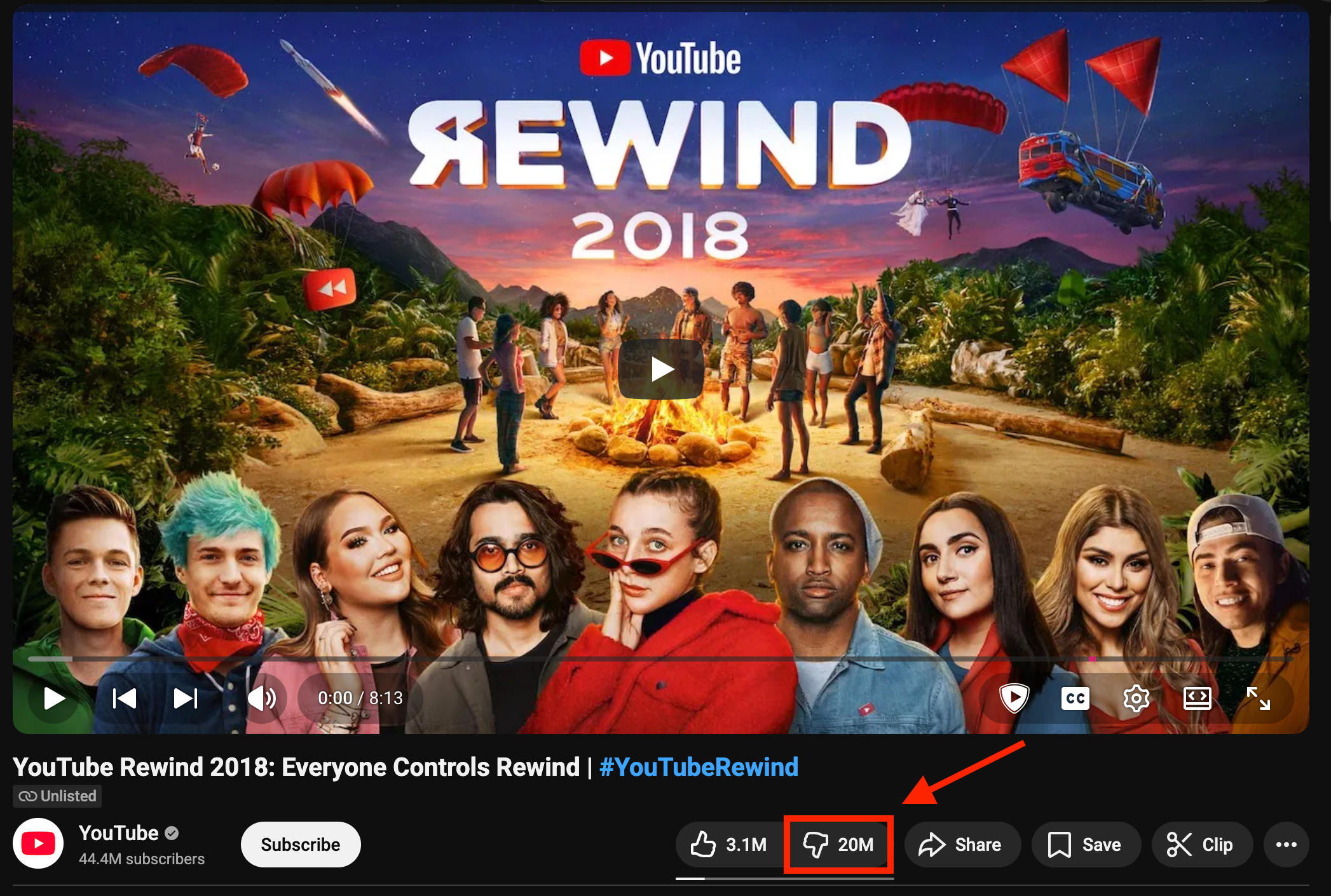
However, many users suspected that it was a result of the failure of YouTube’s 2018 Rewind video, which to this day stands as the most-disliked YouTube video of all time.
Many users still consider dislikes important, especially when it comes to combating misinformation, but despite a call to restore dislikes, YouTube shows no sign of restoring dislike numbers any time soon.
How To Check Dislikes On YouTube On Phone
While there's currently no way to directly see the dislikes count on YouTube videos accessed via a mobile device, there is a simple workaround that can be used for any video.
First, visit the YouTube video of your choice. You can use a desktop browser, mobile browser, or the YouTube app for this.
From here, copy the video URL either via the address bar or by clicking the Share icon.
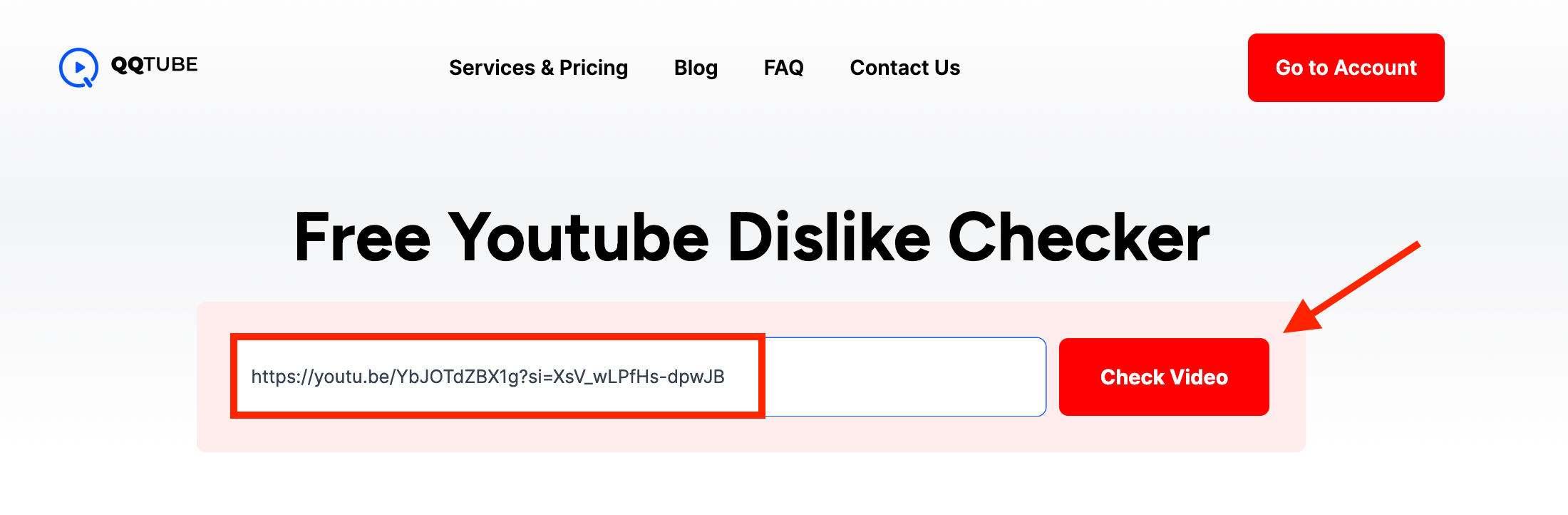
Visit our free YouTube Dislike Checker and paste in the URL of your video.
Click Check Video.
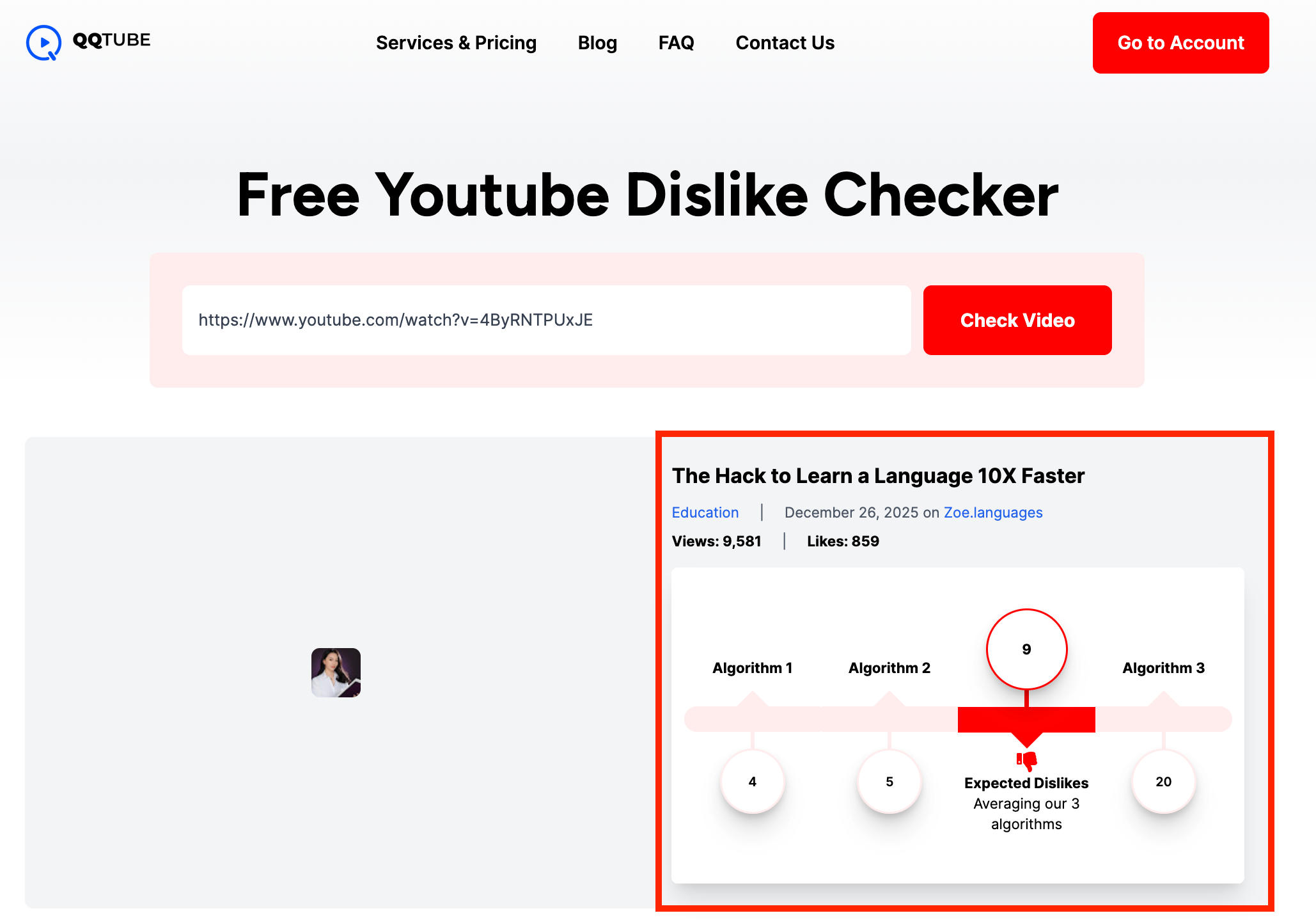
You will then see the number of dislikes that this video has received.
How To Check Dislikes On YouTube On Desktop
On desktop, you can either use the YouTube Dislikes Checker method as outlined above, or you can add a browser extension to reveal the dislikes metric on every video you watch.
The most popular extension is Return YouTube Dislike, which you can install for Chrome here and for Firefox here.
Once the extension has been added to your browser, you’ll be able to visit any YouTube video and see the dislikes metric to the right of the likes metric, just as it appeared before 2021.
How To See Your Own Video's Dislikes Count
When it comes to your own YouTube videos, you can easily see the exact likes and dislikes count by accessing YouTube Studio.
Click the Content menu on the left hand side.
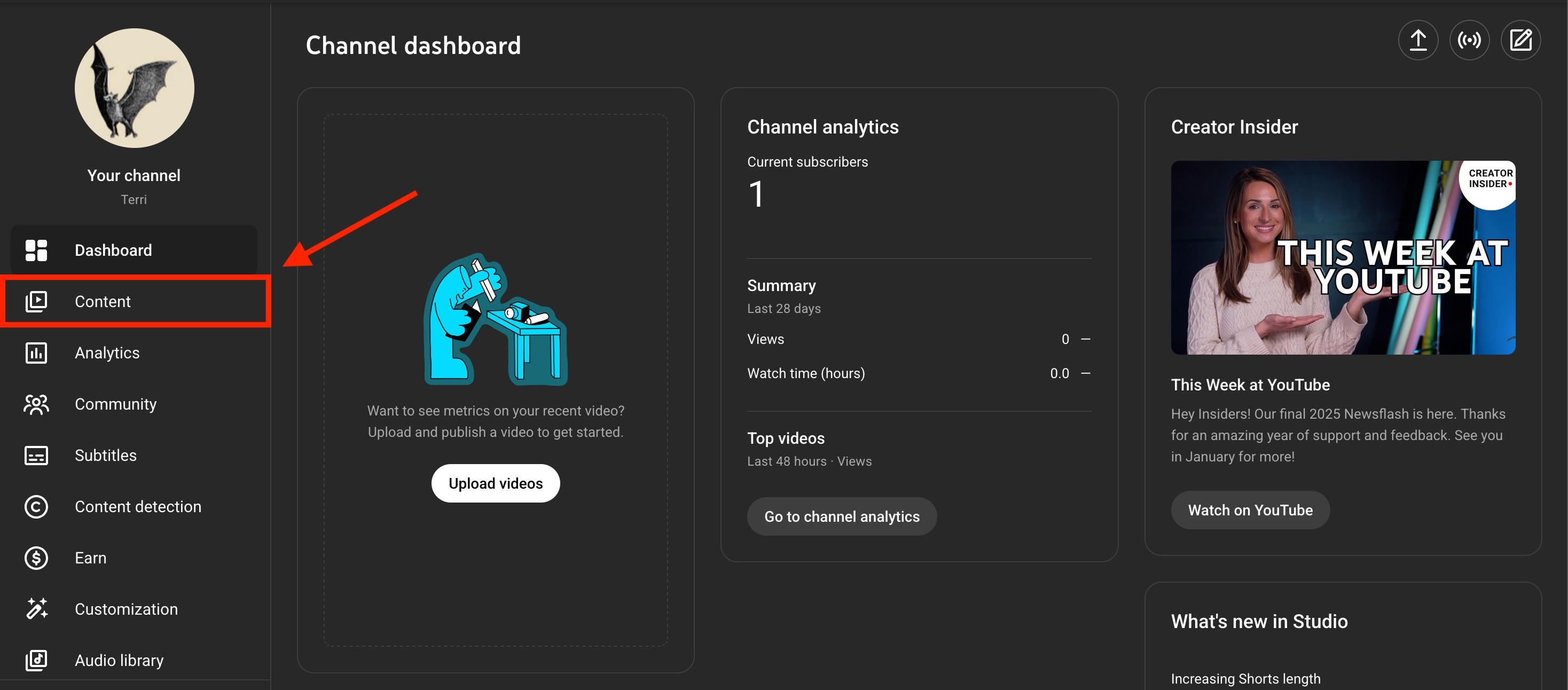
Click the video you wish to see the dislike count for.
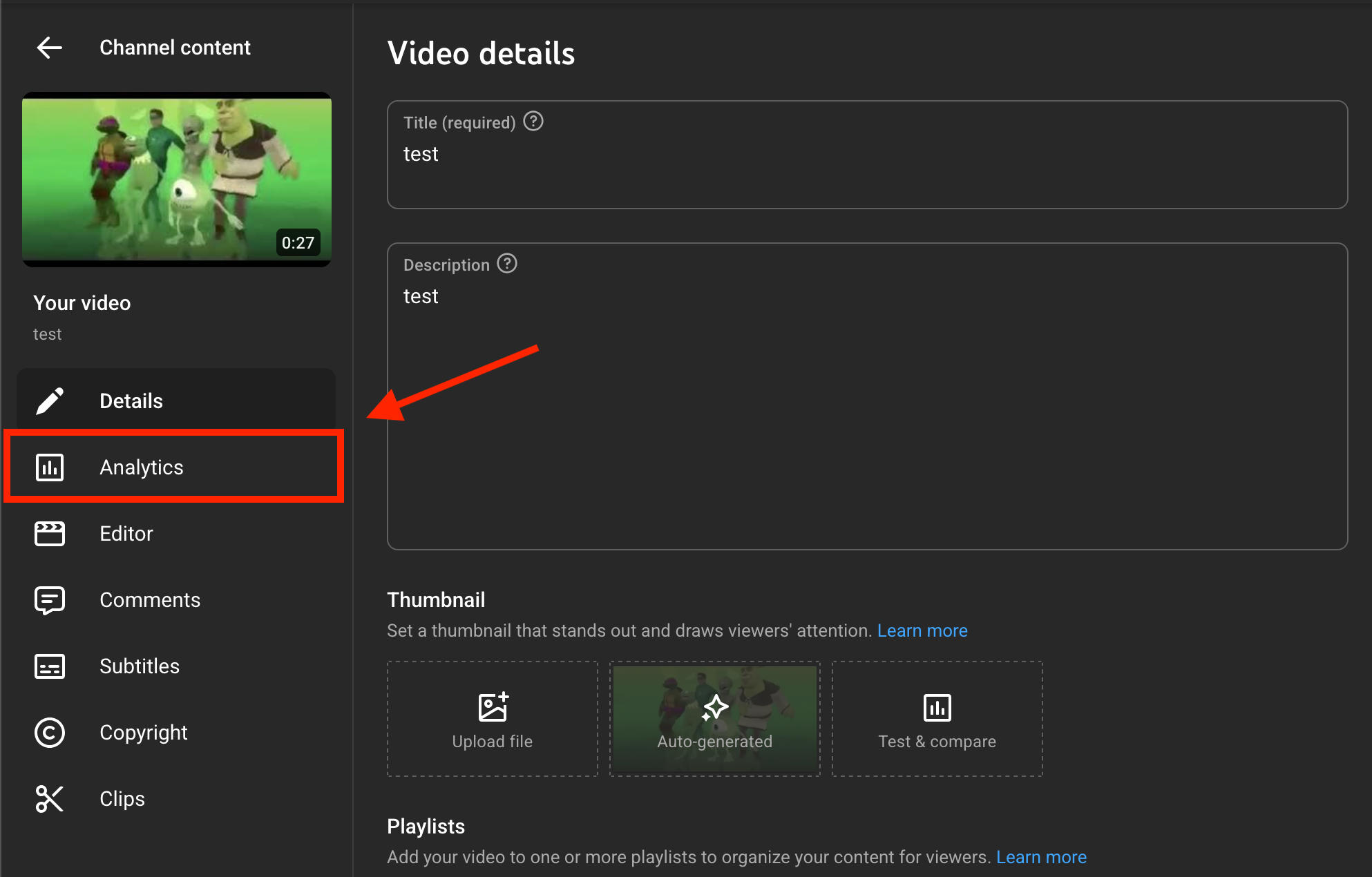
Click Analytics on the left hand menu
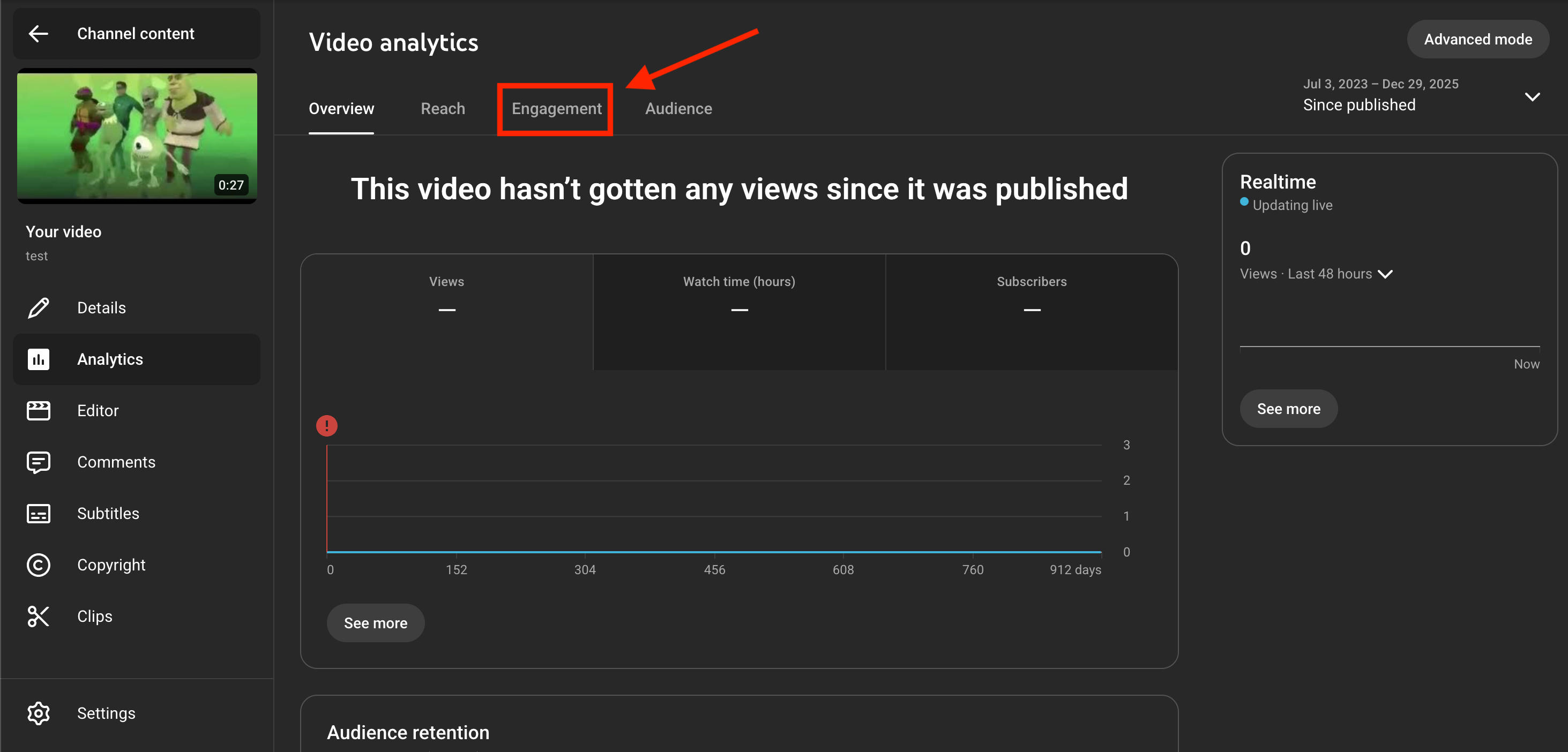
Click the Engagement tab
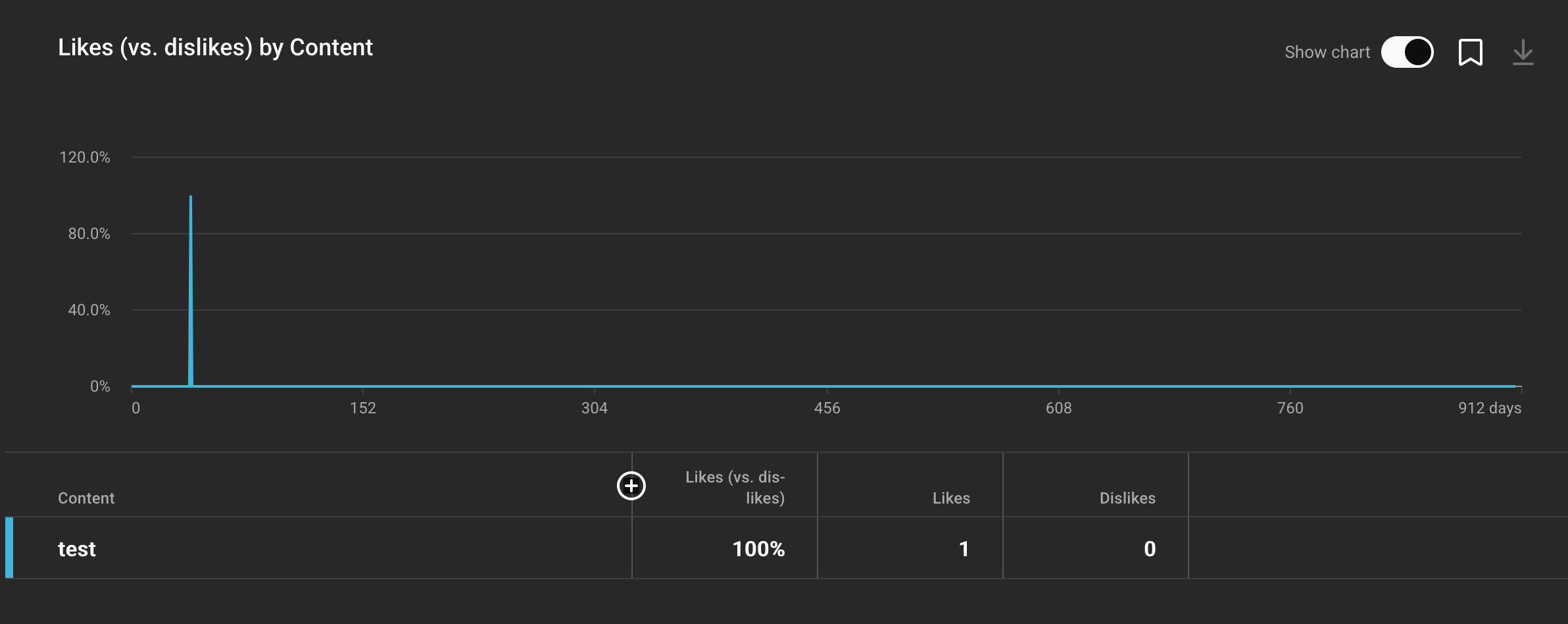
On the bottom right, you'll see a Likes (vs dislikes) section. Click See More.
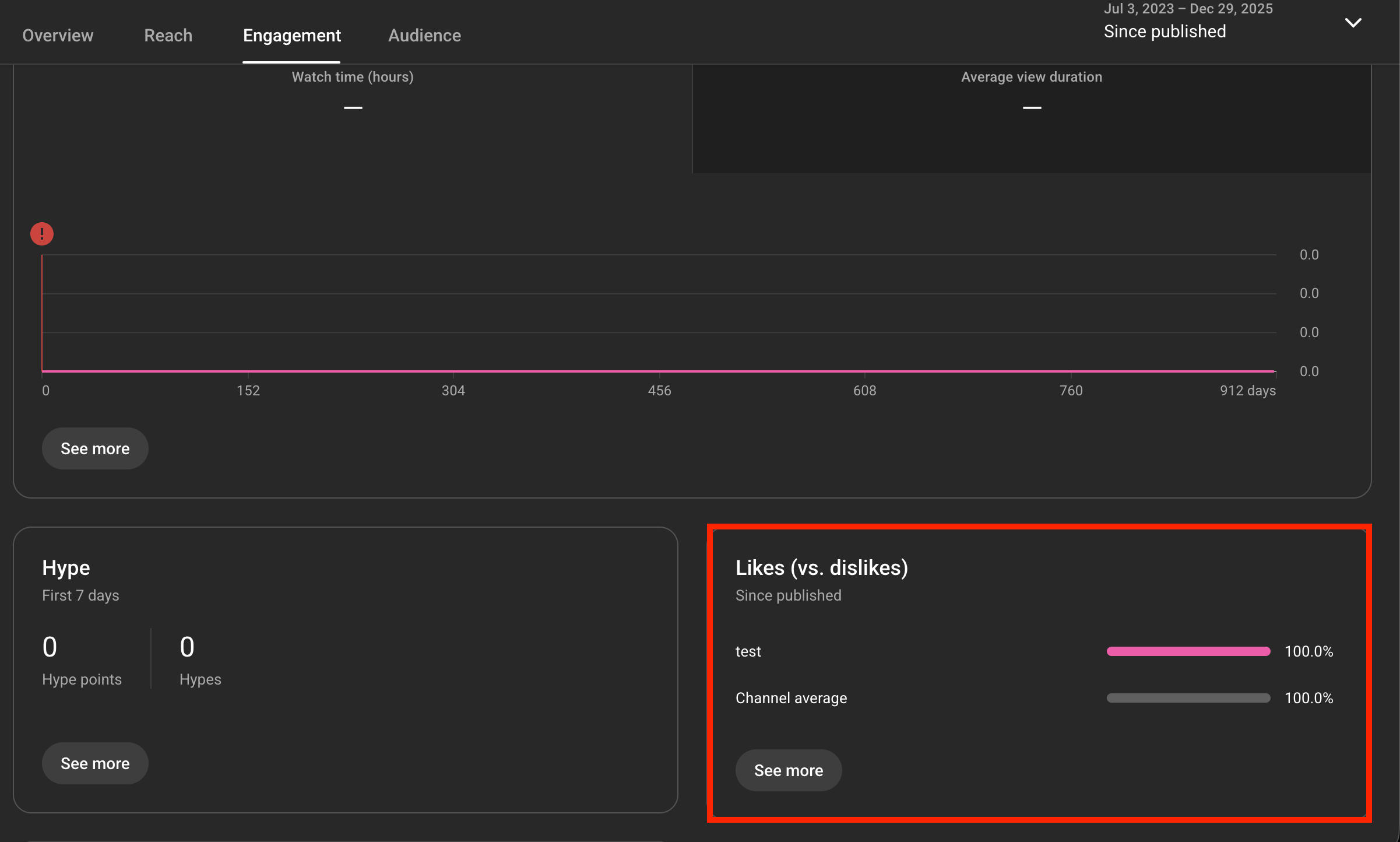
From here you will be able to see a detailed breakdown of your Likes and Dislikes engagement over time as well as each individual count.
Can People See If You Dislike A Video?
Fortunately, the dislikes feature is totally anonymous.
While video creators can see the total count of likes and dislikes via YouTube Studio, they can’t see specifically who left those engagements.
This also applies to views and shares.
In fact, the only engagements on YouTube that aren’t anonymous are comments and subscriptions, though the latter does have limitations when it comes to channel owners being able to view their subscriber list.
How Do You Know Who Likes & Dislikes Your YouTube Videos?
The short answer - you can’t. You can see the total number of likes and dislikes from YouTube Studio but not the names of the users who left them.
Why Are People Disliking My YouTube Videos?
If you’re suddenly receiving an unusual number of dislikes on your YouTube content, it could be due to one of the following reasons.
Your Content Is Inaccurate
One of the most common reasons that users leave dislikes is because the video content is in someway inaccurate or misleading.
Review your video and try to see it as an outsider would.
- Are you providing completely accurate information?
- Are you expressing your point in a mature and respectful way?
- Are you citing sources for any big claims you’re making that could impact someone’s wellbeing?
Making sure that your video is as thorough and truthful as possible is the first step to avoiding dislikes.
Your Video Is Controversial
If your video is discussing politics, health, religion, money, or another divisive topic, chances are your perspective is considered controversial by someone out there.
Because of this, it’s natural to receive a number of dislikes on videos in these niches. However, it’s always wise to do your due diligence and ensure that everything in your video is as well-researched and respectfully presented as possible.
If you’ve mentioned a brand sponsor in your video, the dislikes could be coming as a result of that as well, depending on the brand’s reputation.
You’re Being Dislike-Bombed
If your video has nothing controversial in it and it’s not something you would’ve needed to research (say, for example, a vlog about your daily routine), it’s possible that you’re being mass-disliked as part of an attack.
This could be due to a particularly vindictive viewer or another creator trying to sabotage your content.
Unfortunately the only way to counter this is by getting more likes on your videos.
How To Get More Likes On YouTube
If you want more YouTube likes, you can wait until you accrue thousands of viewers and subscribers - but that could take months, if not years.
The quicker (and smarter) way is to buy YouTube likes from a high-quality provider like QQTube. This process allows you to input the URL of your video and receive any number of likes within a short period of time, all from real YouTube viewers with active accounts.
With this method, you can build up your engagement levels without waiting ages for organic growth and increase your chances of appearing in viewer recommendation sections or even the YouTube homepage.
To get started, create a free QQTube account by clicking the Sign Up button here.
Frequently Asked Questions
Can you see dislikes on YouTube anymore?
No, YouTube removed the dislikes feature in late 2021.
What replaced the dislike feature?
Nothing, YouTube hid the dislikes count but the ability to dislike a video is still there and the video creator can see the count through YouTube Studio.
Did the dislike removal stop harassment?
Not necessarily, since creators can still see the dislikes count and savvy users can work around the update with the help of browser extensions.
Did YouTube update their buttons?
Yes, in 2021 YouTube hid the count on the dislikes button.
How do I bring dislikes back on YouTube?
You can use a YouTube dislikes checker or a free browser extension. Learn more here.
How to check dislikes on Youtube on phone?
Use our free YouTube dislikes checker here.
How to see dislikes on YouTube without extension?
You can use our YouTube dislikes checker.
How do you see dislikes on YouTube mobile?
If you don’t want to use a browser extension, check out our YouTube dislikes checker here.
Can you still view dislikes on YouTube?
Yes, learn how to view dislikes as a viewer here or as a creator here.
Why is YouTube not showing dislikes?
YouTube removed the dislikes count in 2021 but the feature still remains so you can leave a dislike but it won’t be publicly visible unless other viewers are using a browser extension.
Is YouTube's dislike system still gone?
The dislikes count is gone, but the ability to dislike a video is still there and the video creator can still see their dislikes count.


