Do people get notified when you unfollow them on Instagram?
Thankfully the answer is no - Instagram’s unfollow feature is anonymous.
However, while the platform doesn’t send a notification when you’ve unfollowed a user that doesn’t mean it’s impossible for them to find out.
Today we’ll run through what Instagram notifies users of, what happens when you unfollow someone, how you can check unfollowers, and more.
Key Points:
Unfollow Notifications On Instagram
Instagram won’t notify a user if you simply unfollowed their profile.
The only time Instagram sends a notification regarding the follow process is when you follow someone, but there is a grey area for this.
Does Instagram Notify When You Unfollow & Follow Back?
Yes. While unfollowing someone doesn’t generate a notification, following someone does - regardless of whether or not you were following them before you unfollowed.
Does Instagram Notify If You Follow & Unfollow Quickly?
That depends. Some users claim that if you follow someone and then instantly unfollow them the in-app notification will disappear.
However, it’s still likely that they received a push notification about your follow, in which case the notification is centralized to their device and not the app. In this case, they’d most likely notice that you unfollowed them immediately after the initial follow.
Either way, there’s no guarantee that your initial follow will be completely anonymous, even if you unfollow them within a second.
If You Unfollow A Private Account On Instagram Will They Know?
No, unfollowing never generates a notification, regardless of the users’ profile privacy.
Following a private account does generate a notification, and in this case the user will have to accept your follow request before you’re able to view their profile and content.
Alternatives To Unfollowing On Instagram
Let’s say you’re no longer interested in following someone’s content but you’re hesitant to unfollow them outright just in case they notice; don't worry, Instagram has features that account for this.
Muting Someone On Instagram
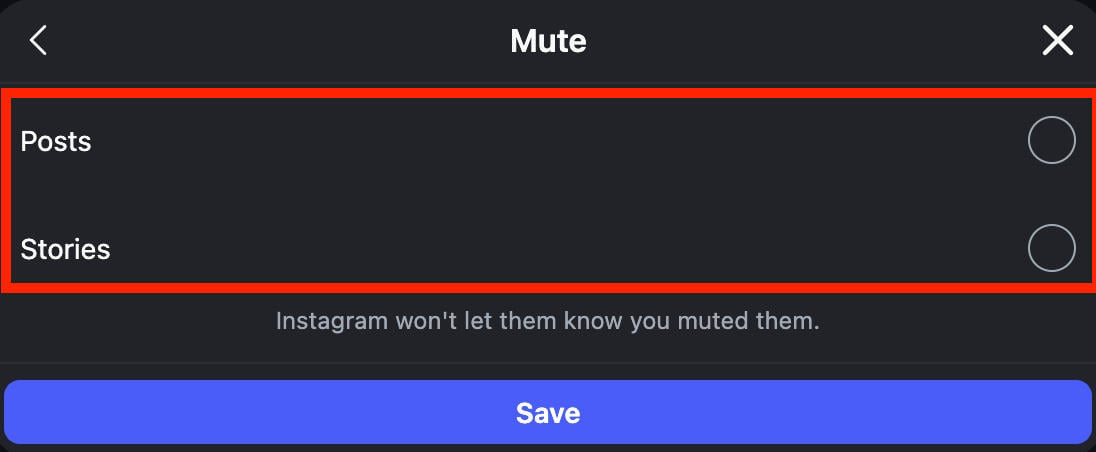
A simple alternative is to mute the user, which will hide their Story, posts, and messages without you having to unfollow them or block them.
To mute a user, you’ll have to be following them.
Open their profile page and click or tap the Following button.
Select Mute.
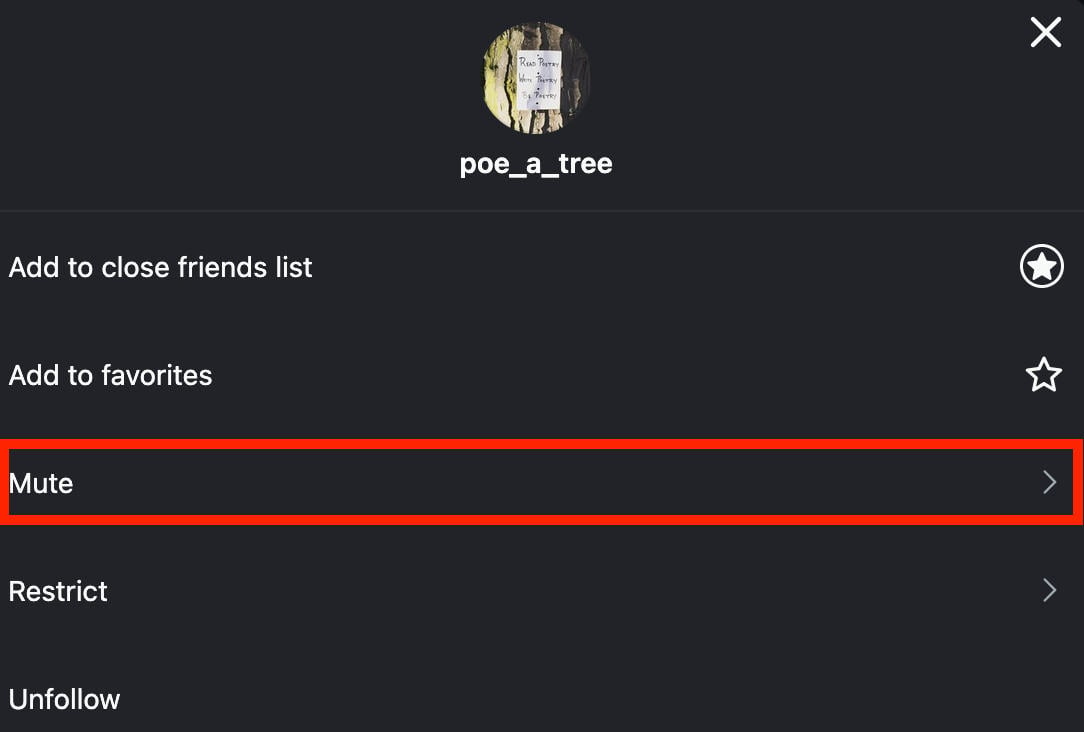
Choose where you want to mute them, then Save your choice.
Blocking Someone On Instagram
If you really don’t want to see them on Instagram, but would rather not have them find out, you can block them instead.
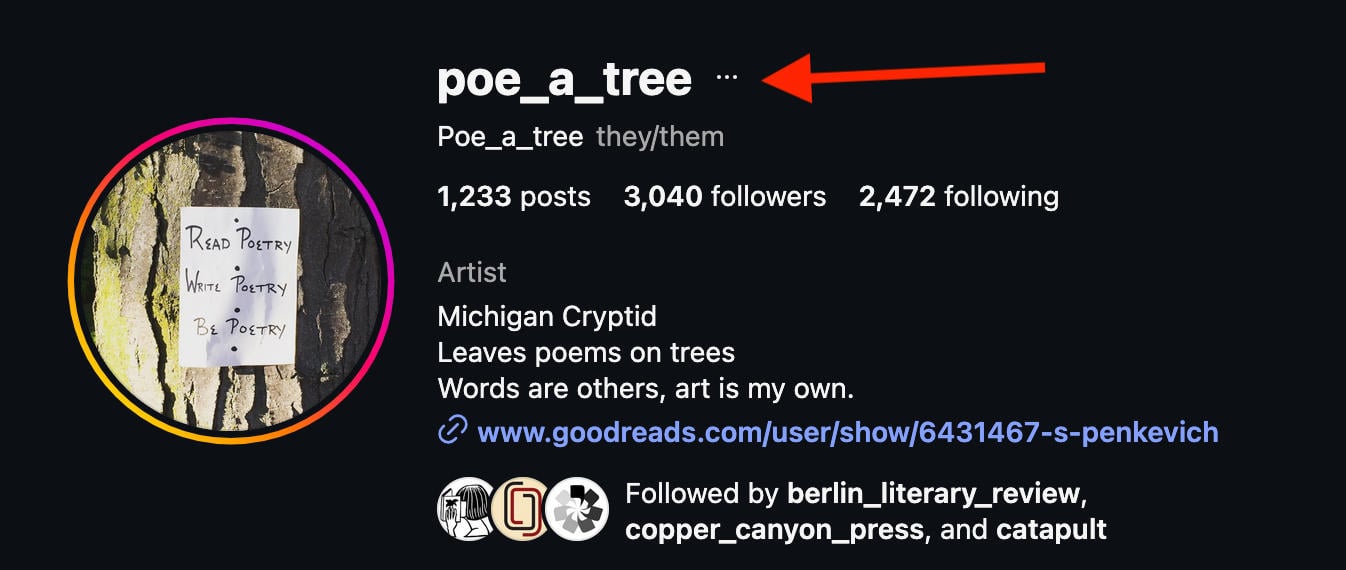
Navigate to the user’s profile page.
Click or tap the three dots on the top right corner of their page.
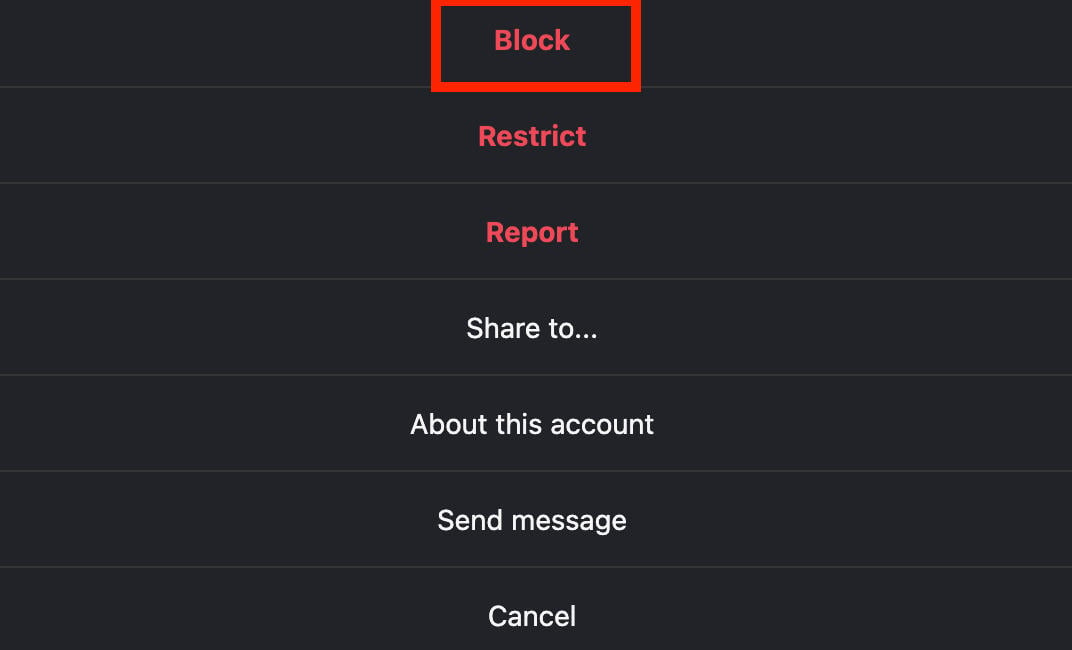
Select Block and confirm your choice.
What Happens When You Unfollow A Follower On Instagram?
When you unfollow someone who is following you on Instagram, not much happens aside from their content no longer appearing in your home feed.
If their account was private when you unfollowed them, you’ll no longer be able to see their full profile and post grid.
Additionally, Instagram’s follow suggestions will no longer be influenced by that users’ network.
If You Unfollow Someone On Instagram Will They Still Follow You?
Yes, unfollowing someone won’t impact whether or not they’re following you in regards of the platform’s system.
However, it’s always possible that they may choose to unfollow you if you’re no longer mutuals. But, as we touched on earlier, there’s no notification when you unfollow someone so this would rely on them actively noticing that you’re no longer present on their followers list.
How To Stop Someone From Following You
If you’ve unfollowed someone and would rather not allow them to follow your account any longer, you have three options: removing them from your followers list, restricting them, or outright blocking them.
Removing Someone As A Follower
To remove someone from your following list, open Instagram and visit your profile page.
Click or tap the Followers list at the top of your profile.

Click or tap Remove to the right of the follower you wish to remove.
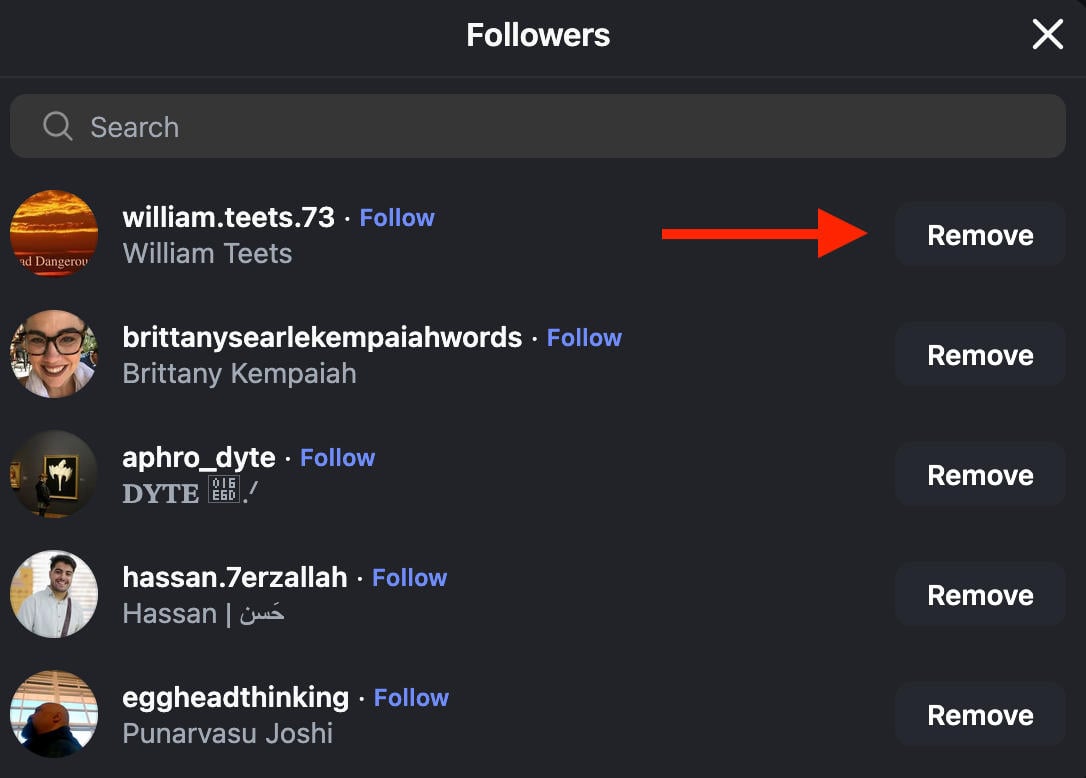
They’ll no longer see your posts in their feed and if your account is set to private they’ll have to request to follow you again.
Restricting Someone
Navigate to the user’s profile page.
Click or tap the three dots on the top right corner of their page.
Select Restrict and confirm your choice.
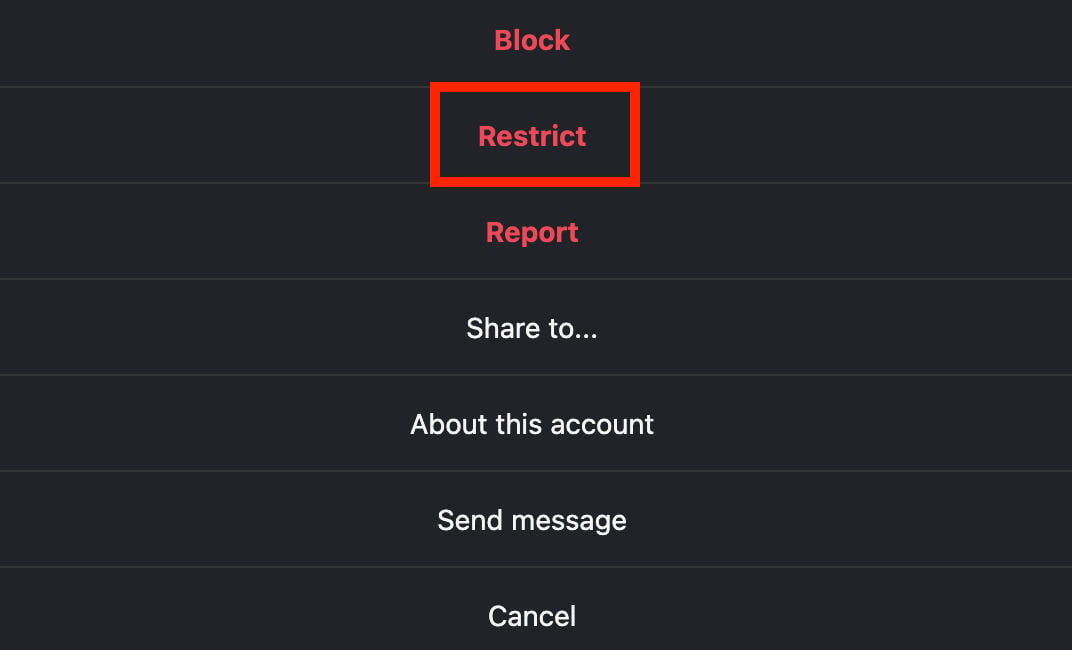
Restricting someone prevents them from seeing when you’re online, and you won’t be notified when they comment on your posts.
Blocking Someone
Navigate to the user’s profile page.
Click or tap the three dots on the top right corner of their page.
Select Block and confirm your choice.
Blocking someone prevents them from seeing your profile entirely, even if you had a shared DM or were both tagged in the same post. It will be as if your profile never existed on Instagram.
However, if they view your profile while logged out or from a different account, they’ll be able to see you.
Can You See If Someone Unfollowed You On Instagram?
As you know, Instagram doesn’t notify users when they’ve been unfollowed but that doesn’t mean it’s impossible to find out.
If you’re curious about your unfollowers your best bet is to is to generate a list of your Instagram followers, then generate another list after waiting a few weeks (or longer). You’ll then be able to compare the two to see who’s missing from the second list, which will be the accounts who unfollowed you.
It might sound complicated, but it’s straightforward and won’t take more than a few minutes to get started.
The following instructions require you to open your Instagram profile from a desktop browser.
Click your follower list.
Scroll to the bottom until the full list has loaded and there are no followers left to load.
Open your browser developer tools by pressing F12.
Click the Console tab.

Paste in the following code and hit Enter:
 var data = "";
 document.querySelectorAll('.xt0psk2').forEach(e => {data += e.href + 'n';})
 console.log(data);
You should receive a URL of every follower’s profile page.

Copy this list into an Excel sheet or Google Sheets.
After some time has passed, repeat the steps above and paste in the second list in the same column as the first one.
Now we'll find any duplicates between the two lists - these will be users who were previously following you and are still currently following you.
Highlight the column you wish to find duplicates in.

Click Format > Conditional Formatting in the top menu.

In the Format Calls If... box, click Custom Formula Is.

Paste in the following formula: =COUNTIF (A:A, A1)>1

Any duplicate listings will be highlighted - these are the users who are still following you.
If someone appears in the first part of the list, but not the second part of the list that means they unfollowed you.
If someone appears in the second part of the list but not the first, that means they’re a new follower.
How To Get More Instagram Followers

If you’re dealing with a constant stream of unfollowers, or just want to boost your Instagram presence a little more, there are a few ways to get more Instagram followers without waiting months and years.
Networking Groups
Some users utilize networking groups, either within Instagram or on platforms like Facebook.
These groups are dedicated to helping budding influencers and small business grow their following by offering follow for follow networks.
When you join one of these groups, you’ll be prompted to follow your fellow members in exchange for a follow from each of them.
The Cons: While usually this results in a quick increase in followers, most of these users are more interested in gaining followers of their own and are less likely to engage with your content and continue following you in the long-term.
Follow Trains
Similar to networking groups, follow trains are accounts dedicated to helping users gain more followers.
These accounts will create a post that you’re required to like or comment on. You’ll then be prompted to follow every other user who has engaged on that post, and they’ll be prompted to do the same.
The Cons: While this is similar to the process offered by networking groups, oftentimes follow trains have a higher turnover rate which means many of the followers you gain might immediately unfollow you days or weeks later.
Additionally, there’s no guarantee that your followers will actually engage with your content and their accounts might be flagged as spam due to engaging in this type of behavior repeatedly.
Not to mention when you follow for followers your follow to following ratio is nearly 1:1, which looks suspicious to other users and Instagram’s algorithm.
It’s risky, but some users swear by it as a way to grow instantly. However, there are safer alternatives.
Buying Instagram Followers
When it comes to growing your following in a reliable, secure way, QQTube has everything you need.
You can buy Instagram followers and engagement such as likes, comments, shares, and even saves all from one convenient marketplace. The best part is, every follower and bit of engagement is backed by real, active Instagram users who actually stick around.
All you need is the link to your profile or post, no passwords required. Plus, QQTube’s bot-free guarantee means you’ll receive engagement from actual people on the platform.
Create a free account here and start boosting your Instagram profile today!
Frequently Asked Questions
How often should I check unfollowers?
That depends on your profile goals, but once a month is a solid baseline without requiring you to obsess over it. Learn how to generate a list of your baseline following here.
When you unfollow someone on Instagram can they still see your posts?
Yes, unfollowing someone doesn’t affect whether or not they can access your content. To prevent them from viewing your profile grid, you can choose to restrict or block them. Learn how to do that here.
What happens when you unfollow someone on Instagram?
Unfollowing someone means you won’t get their posts in your feed and their Story won’t appear at the top of the app. Additionally, if their account was set to private you’ll no longer have access to their profile.
When you unfollow someone on Instagram do your messages disappear?
No, any DMs you shared will remain intact unless you manually delete them.
If you unfollow someone on Instagram can they still message you?
Yes, but depending on the users’ account status your messages to them might not appear in their main inbox. Certain Instagram users with Business accounts have three main inboxes so your message might appear as a request rather than in their primary inbox if you’re not following them.