
Whether you’re an aspiring influencer or just want to help build brand awareness for an existing business, today’s guide has everything you need to get started.
From setting up your first account, to qualifying for the Creativity Program, learn how to become a content creator on TikTok for free.
Key Points:
What Do You Need To Be A Content Creator On TikTok?

Even if you don’t intend to make TikTok content creation a full-time career, there are a few things you’ll need in order to set yourself up for success.
These include digital tools and physical items that can help make the whole process much simpler and save you valuable time and energy.
Digital Tools
Aside from the TikTok app, there are a few useful apps you should consider using to improve your content creation.
Canva is a great resource for graphic design and can help you create eye-catching profile pictures, thumbnails, and even make edits to your video content.
CapCut is a popular video editing tool, particularly amongst TikTok creators.
You should also make use of TikTok analytics, which offers valuable insight into the performance of your individual videos and overall account.
Finally, be sure to familiarize yourself with the different types of content you can create on TikTok and their individual limitations. If you want to be truly successful on the platform, diversifying your content strategy is the way to go.
Equipment
When it comes to equipment, there are three things you should invest in:
-
A quality ring light
-
A microphone
-
A camera or phone to film on
Many creators just use their phone’s built-in camera and mic to start with, and even some super-popular creators continue to use the basics. Try it out and see if it works for you but if you find that your video is grainy or your audio is difficult to understand, you’ll need to upgrade your setup if you want to see real results.
How Do I Start As A TikTok Content Creator?
So now that you have everything you need, how do you get started?
First, and most importantly, create your TikTok account! If you already have one, make sure you’re comfortable using your personal account to start creating content.
Once you have an account set up, you can start improving your profile and creating content, which we’ll explore in more detail below.
Before we begin, just remember that the most important thing as a content creator is that you’re consistently creating content. Don’t just post once a month on random days and expect to go viral - if you’re serious about making content creation a career, you need to treat it like an actual job.
Let’s jump right in…
Setting Up Your TikTok Profile
Your profile is your best shot at making a first impression, so take it seriously!
Every TikTok profile consists of the following elements:
-
A profile picture
-
A bio
-
A username
-
A display name
-
A link
Profile Picture
The ideal dimensions for a TikTok profile picture are 200 x 200.
The content of your profile picture is up to you, but there are a few things to take into consideration.
First, make sure that it’s easily discernible at a small size. Users should be able to figure out exactly what’s in your profile picture and recognize it even when it appears as a tiny image on their phone.
Choose something that’s relevant to your brand or the image that you want to give off. A high-quality selfie is often a good idea, especially if you’re aiming to become an influencer.
On the other hand, if your account represents a brand or business, using a logo might be ideal.
Whatever you choose, make sure it’s crisp, clear, and doesn’t violate TikTok’s Community Guidelines.
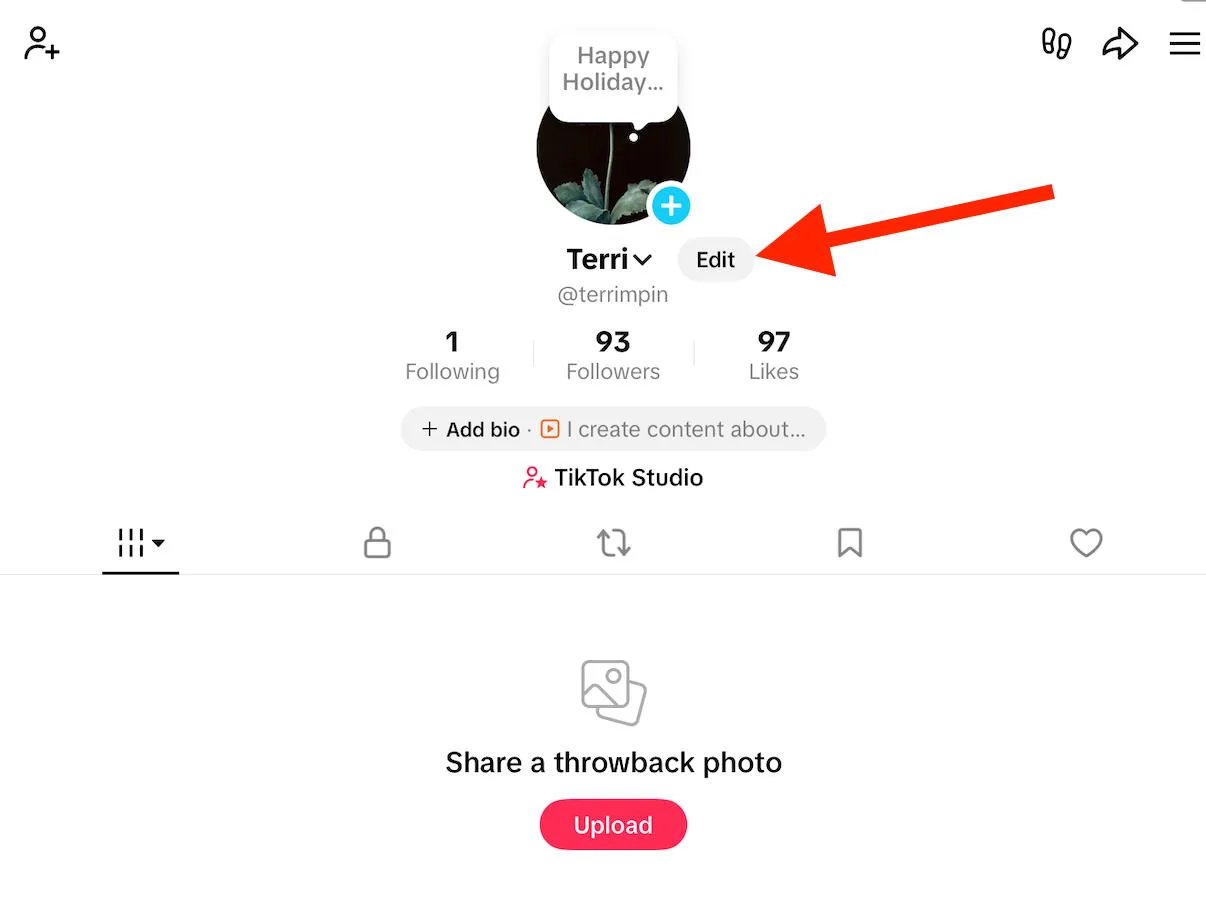
To edit your profile picture, tap Edit on your profile page.
Tap Change Photo.
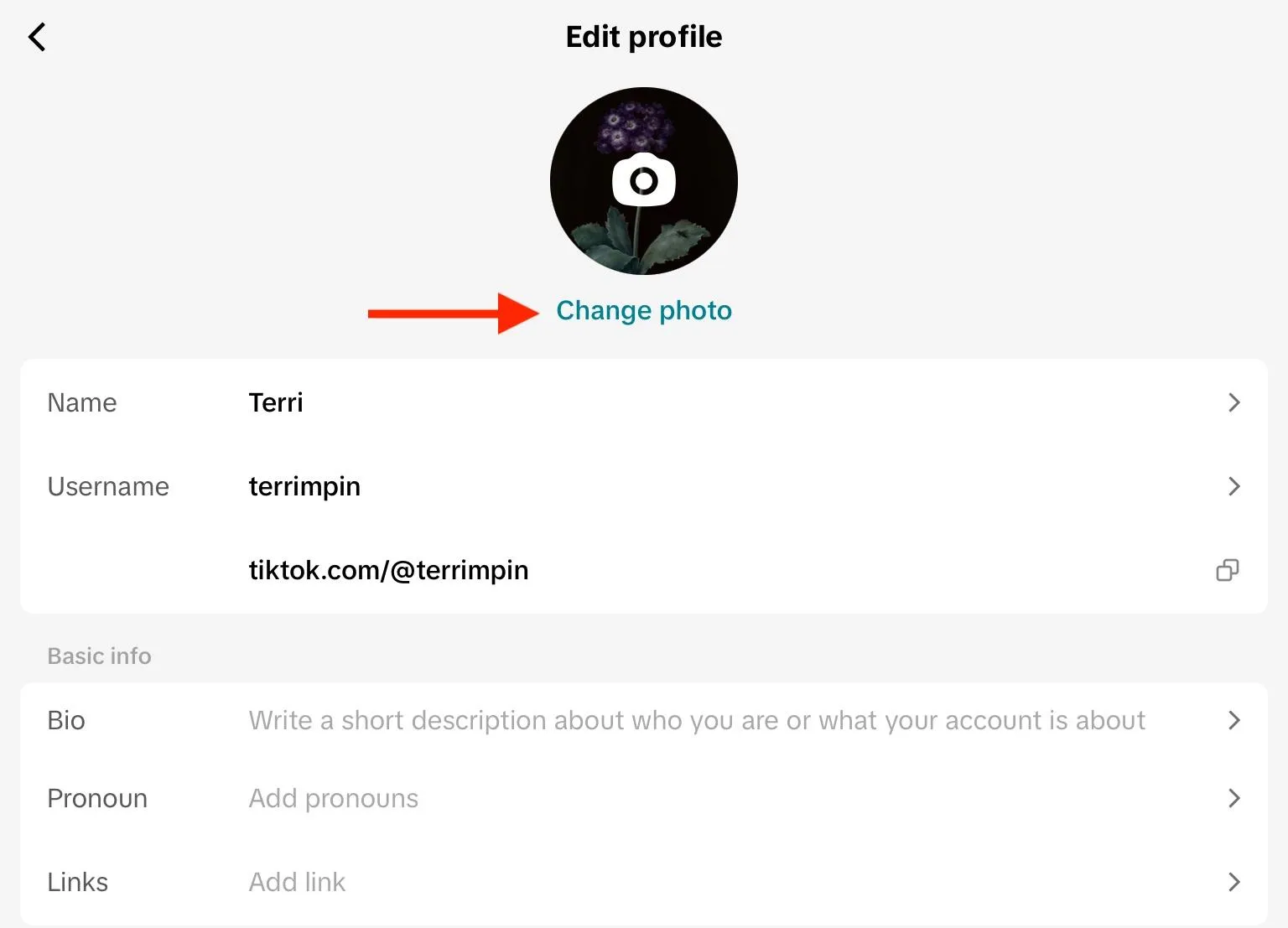
Select your image from your camera roll and confirm your choice.
Bio
TikTok bios have an 80 character limit, so keep things short and sweet. A brief one-liner about what viewers can expect to see from your videos is ideal.
To edit your bio, tap Edit on your profile page.
Tap Bio.
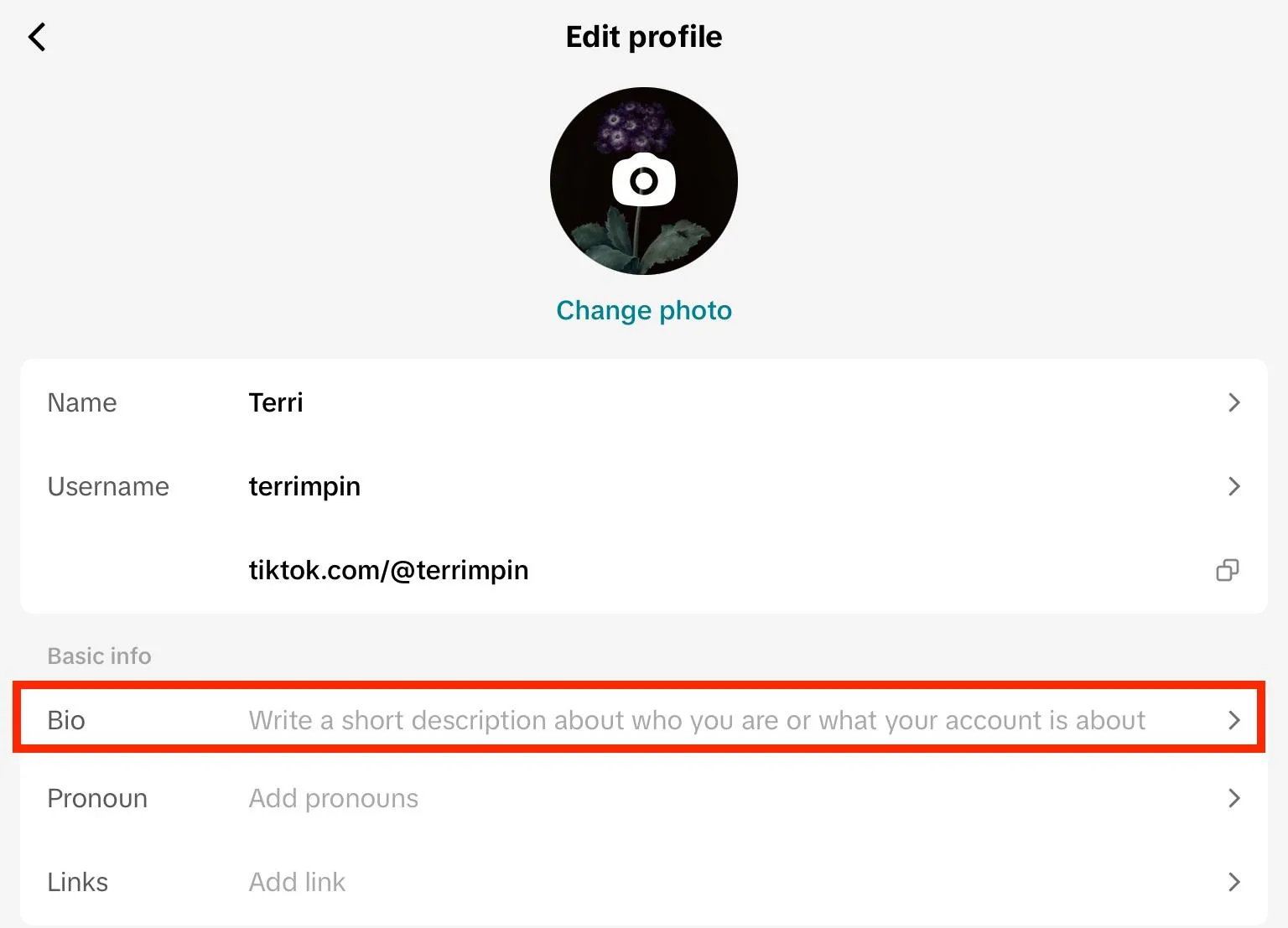
Input your new bio and tap Save to confirm.
Username & Display Name
Your username and display names are two separate things, but try not to make them too different.
Your username is your handle, and is preceded by the @ symbol. This is what users can use to find you on the app, so make sure it’s easy to spell and remember.
If you already have a presence on a different platform, consider using the same handle to maintain a uniform online presence.
For your display name, either use your own name or the name of your brand.
To change your username or display name, tap Edit.
Tap Name to update your display name, or Username and input your new name.
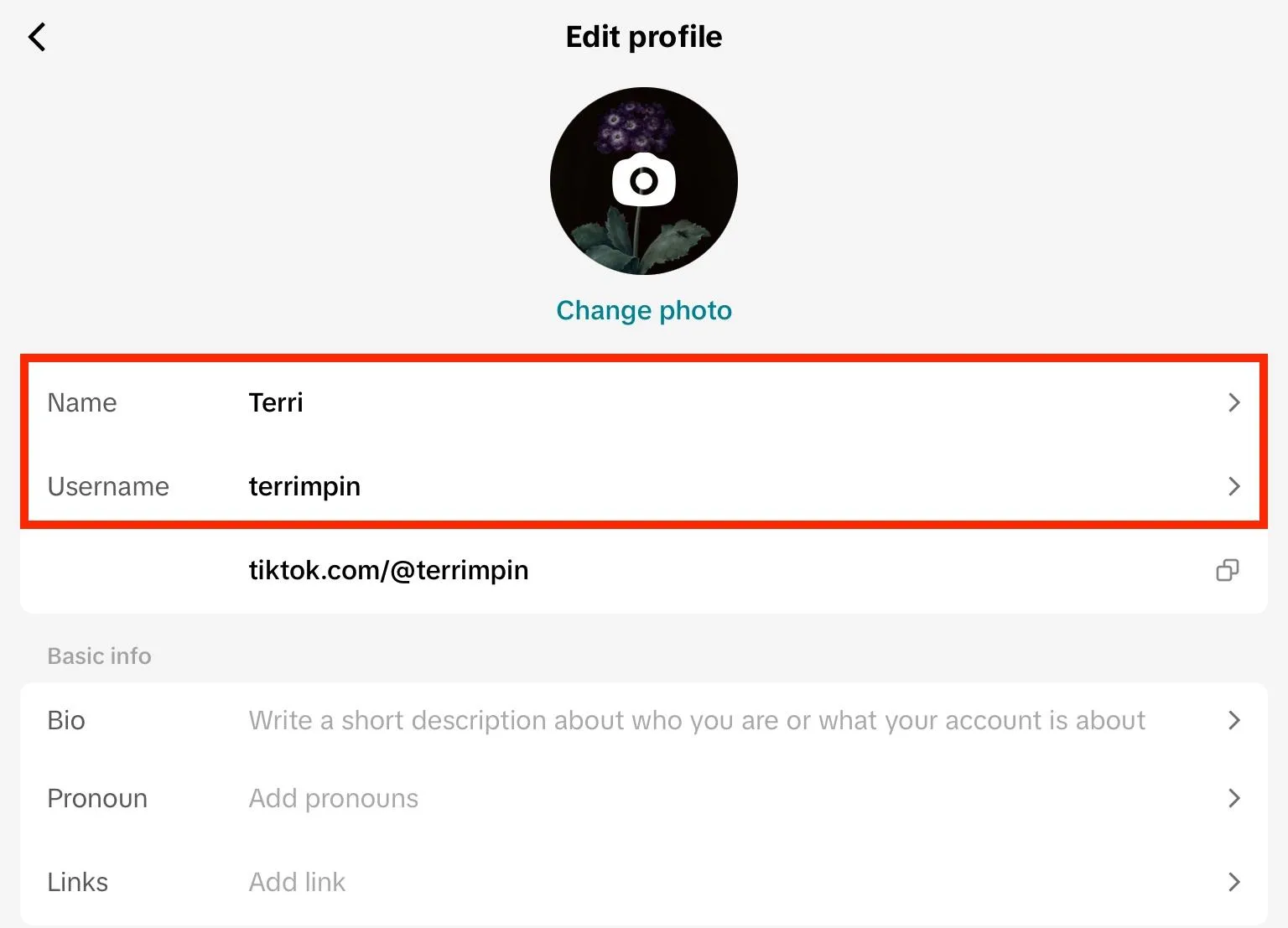
You can change your display name once every 7 days, and your username once every 30 days.
Link
TikTok allows users to include links to a custom website or their additional social media profiles, so make use of this valuable real estate!
Using a landing page service like LinkTree can be useful, since it allows you to include multiple redirections within a single URL.
To add a link to your TikTok bio, tap Edit.
Tap Links.
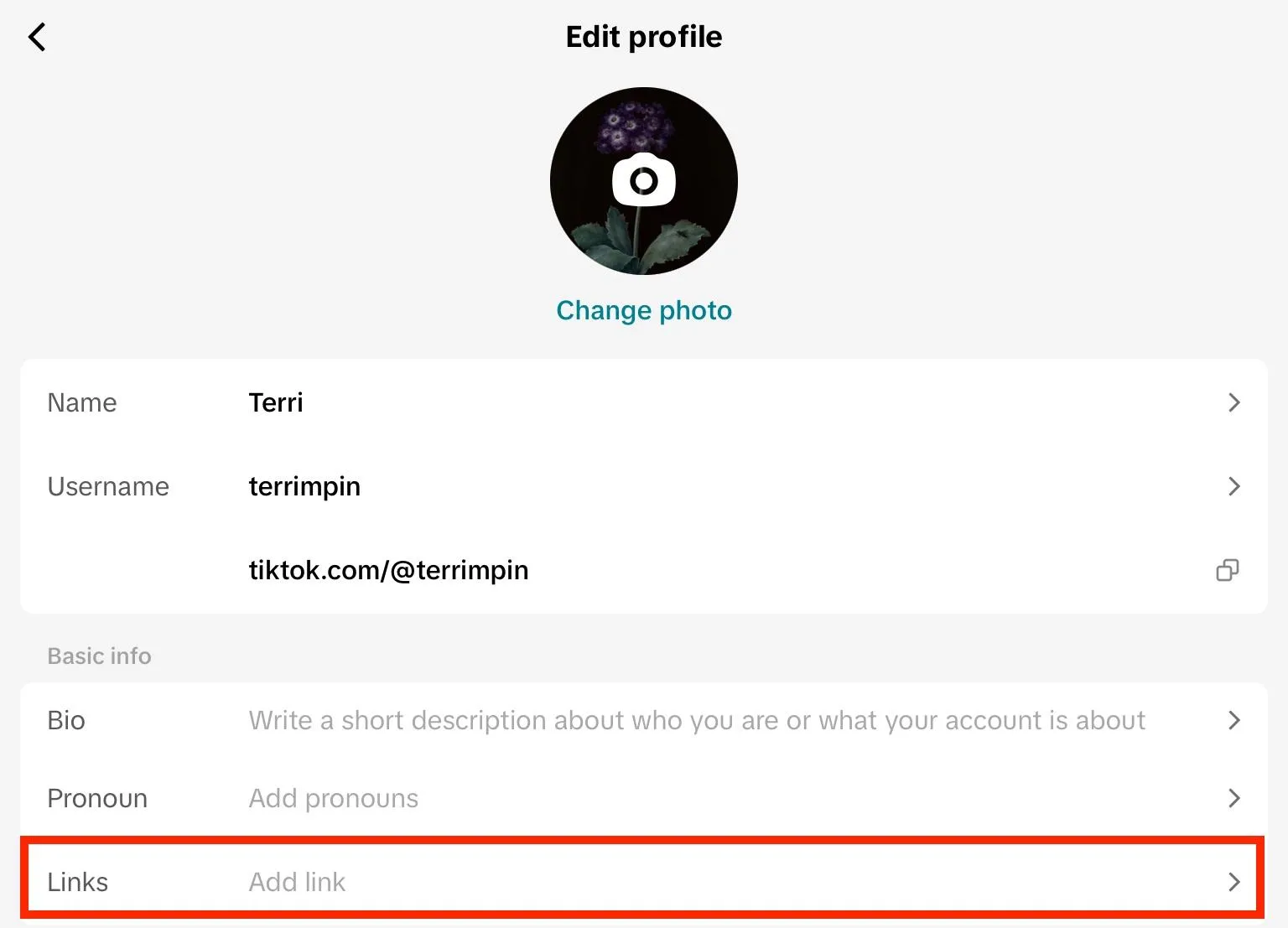
Tap URL or the name of the platform you want to link to.
Paste in your URL and confirm your choice.
NOTE: Custom links are only available for personal profiles with at least 1,000 followers or registered Business Accounts. Learn how to swap account types below.
Switching Account Types
Swapping account types is important if you want to represent a brand or business on TikTok, as it unlocks valuable tools including the TikTok Business Suite, commercial music library, and promotional tools.
If you just want to create content for yourself or as an individual influencer, you can stick with a Personal Account and enjoy useful features like TikTok Analytics, the music and sounds library, promotional tools, and monetization programs.
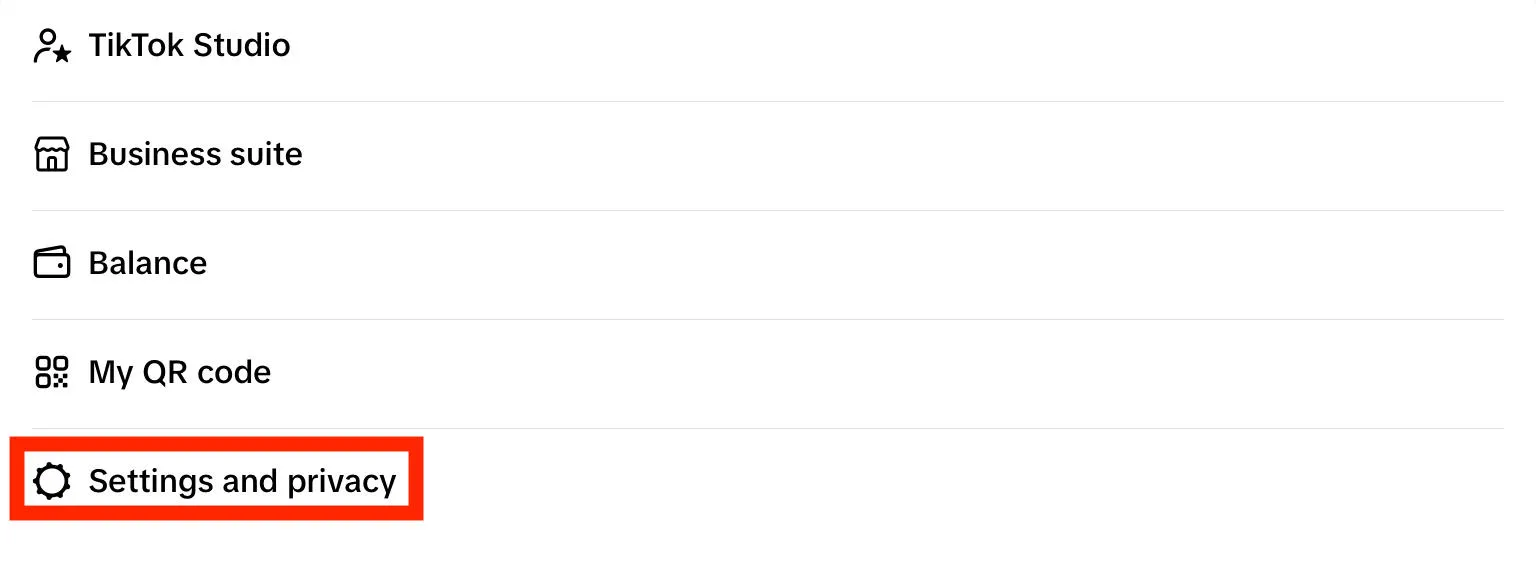
To switch account types, tap the three lines on the top right corner.
Tap Settings & Privacy.
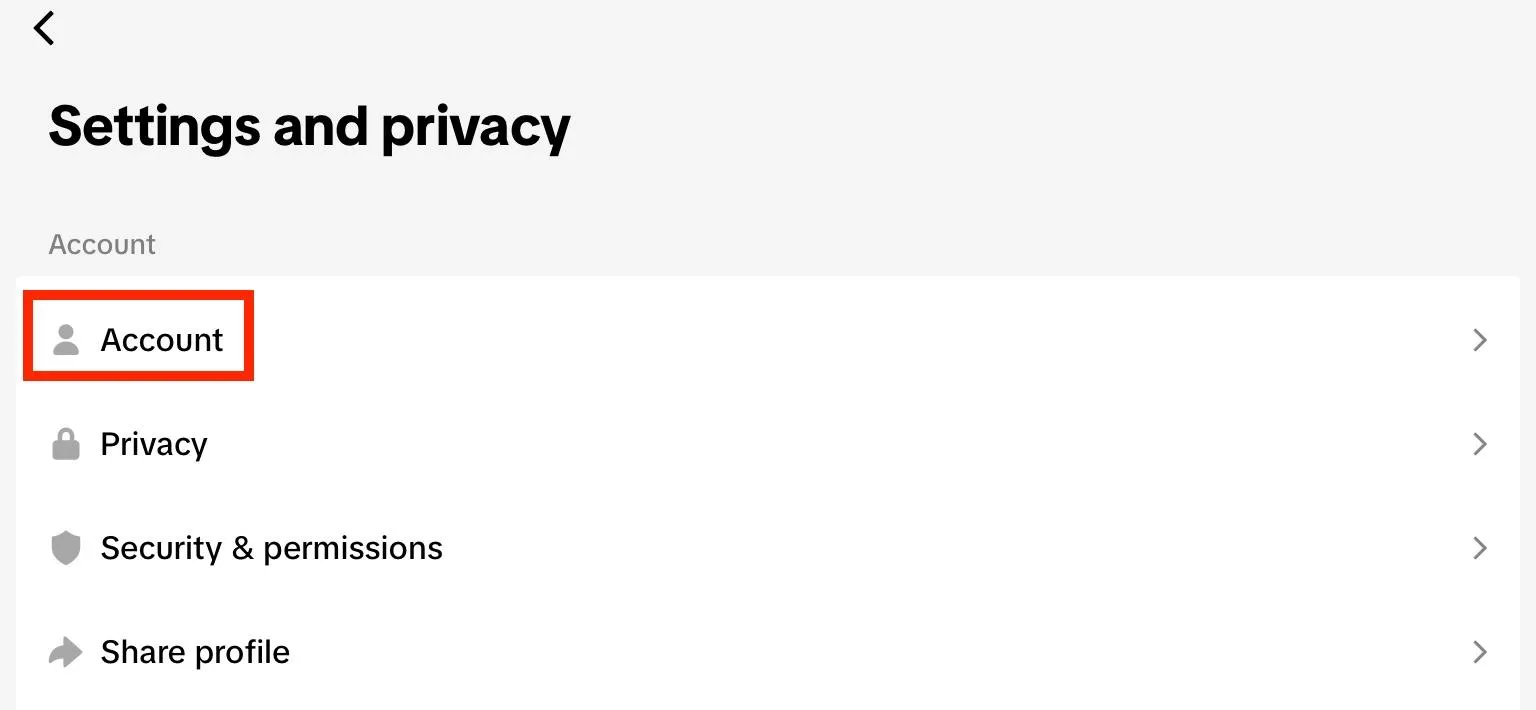
Tap Account.
Tap Switch To Business Account.

Determining Your Niche & Content Style
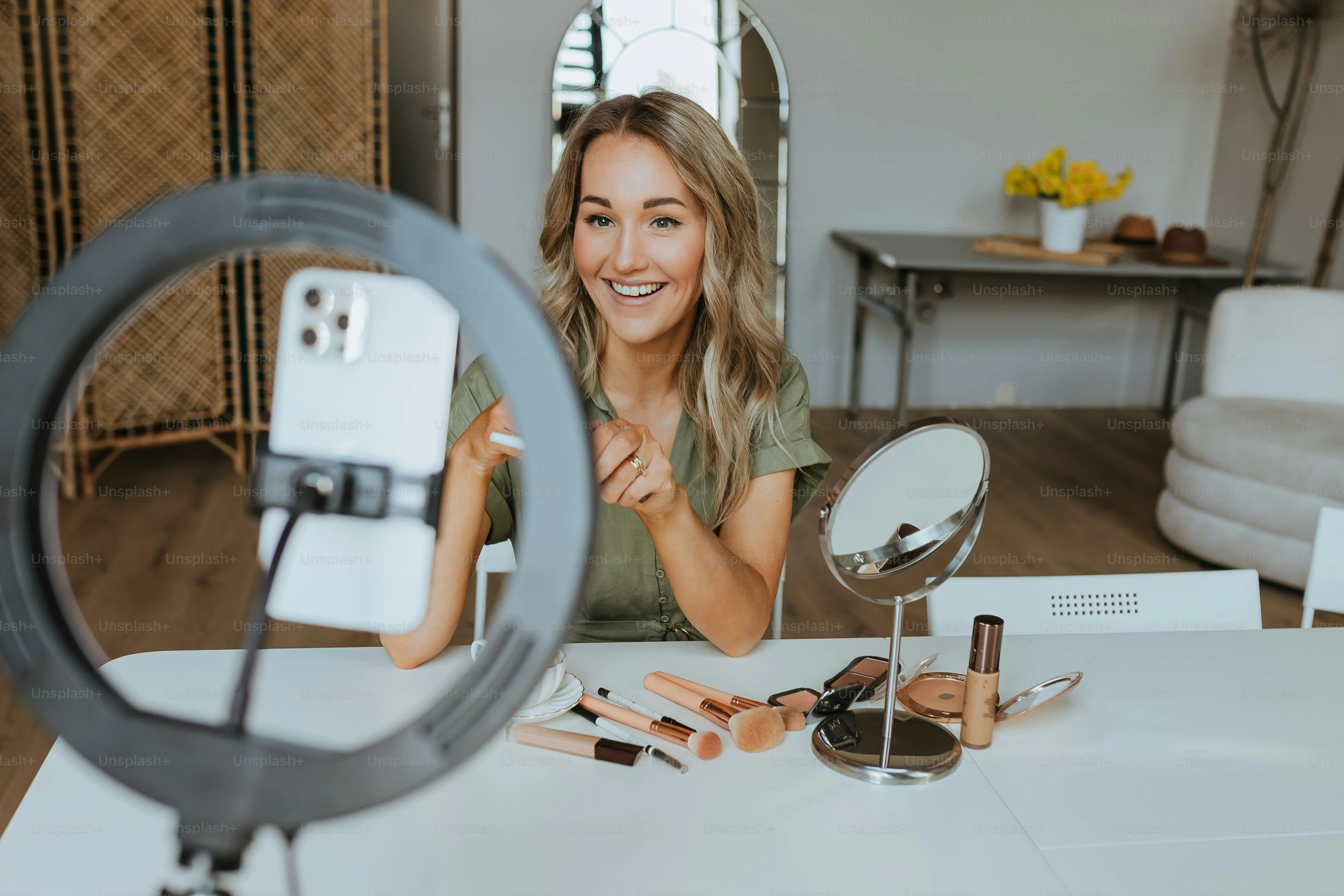
Before you start creating content, you’ll need to get clear on the type of content you want to create.
What’s A Niche?
Your niche determines the subject matter you speak on. This could be beauty, fashion, travel, health, gaming, education, comedy…the sky is the limit!
Don’t worry about limiting yourself to a single niche early on. If you’re not sure what area interests you most, create content for a few different topics to see what resonates with you. You might be surprised by what you enjoy!
Choosing Your Content Style
Your content style determines how you share information from your niche with your audience. Are you a serious creator, or do you put a comedic spin on things? Do you speak to your audience casually, as if you’re friends, or do you have a more reserved approach?
Putting Your Own Spin On Things
Decide early on what you want to bring to the table. If you’re a lifestyle influencer, you can discuss beauty, fashion, travel, and health all within one account - but you should also get clear on how your account is different from the countless others out there.
Maybe you focus only on organic beauty brands, or upcycled fashion. Whatever you choose, make sure that it’s something you’re genuinely passionate about and willing to spend hours creating content for.
Do Your Research
Explore accounts that you admire or that are succeeding in the area you’re interested in.
How are their profiles organized?
How do they interact with their audience?
How often do they post?
What are their captions like, and what hashtags do they use?
Asking yourself these questions will allow you to learn from creators who are already living your dream successfully.
How To Brainstorm Viral TikTok Content
Now that your profile is set up and you know what type of content you’d like to create, it’s time to brainstorm the best content possible.
Find The Content Gap
Since you’ve already researched your competition, you know what kind of content is available - but what’s not available?
Determine the content gap within your niche. This is an area that little to no other creators are speaking on. For example, if you’re interested in sharing recipes and notice that tons of creators are posting about cuisine from their home countries but you notice very few talking about your own favorite dishes, that’s the content gap!
Notice Trends
TikTok is the biggest hub for digital trends, whether it’s the latest dance moves or a catchy song that just won’t get out of your head, so use that to your advantage.
If you notice a specific song is trending, or everyone’s using a particular ingredient in their dishes, integrate it into your own content.
Just make sure you put a unique spin on it so that people have a reason to watch your videos.
Use The Right Hashtags
Hashtags are important, but don’t just type in any vague keyword!
TikTok captions have a 100 character limit, including hashtags, so pick and choose your hashtags wisely.
Take a look at what other creators are tagging their content with and choose what applies to you.
Be sure to browse the hashtag pages to see what else is appearing there; you don’t want to inadvertently use a spammy tag and put your content alongside low-quality videos.
Always Tag Brands
Even if you’re just starting out, tag brands when you mention their products in your videos. This is a great way to get noticed early on and snag brand deals.
It might come as a surprise, but many companies prefer working with micro-influencers (creators who have 1k-5k followers) rather than celebrities since oftentimes these creators have a much more engaged audience base.
Creating Your TikTok Content Schedule
Now that you’re clear on the type of content you want to create, it’s time to choose the right schedule for it.
You could have the best videos in the world, but if you post them when your target audience is asleep they won’t stand a chance!
What’s The Best Time To Post On TikTok?
According to Sprout Social, the best times to post on TikTok are Mondays through Thursdays from 5-9pm.
The worst times, on the other hand, are Sundays and early in the morning.
How To Create A TikTok Content Schedule
Start by deciding your posting frequency. If you intend to post once a week, make sure you’re posting at the same day and time each week.
If you’re posting more than once per week, choose the same days and times each week.
Whatever you decide, consistency should be your focus here.
After you’ve posted for a few weeks, take a look at your TikTok analytics and make any adjustments that are necessary.
TikTok SEO & Creator Search Insights
TikTok SEO is often overlooked, but it can change the way your content reaches audiences. Creator Search Insights can help you determine what users are searching for, so you can cater your content to your audience.
TikTok SEO
On TikTok, SEO includes the keywords you use in your bio, your captions, and your hashtags.
For example, if you’re posting a video about your morning routine but notice tons of trending content talking about “morning routines for students”, find a way to integrate that keyword into your caption and hashtags.
You can use Creator Search Insights to determine what users are searching for, and what keywords or hashtags you should be including.
Using Creator Search Insights
To access Creator Search Insights, tap the Search Bar.
Type in Creator Search Insights.
Tap View.
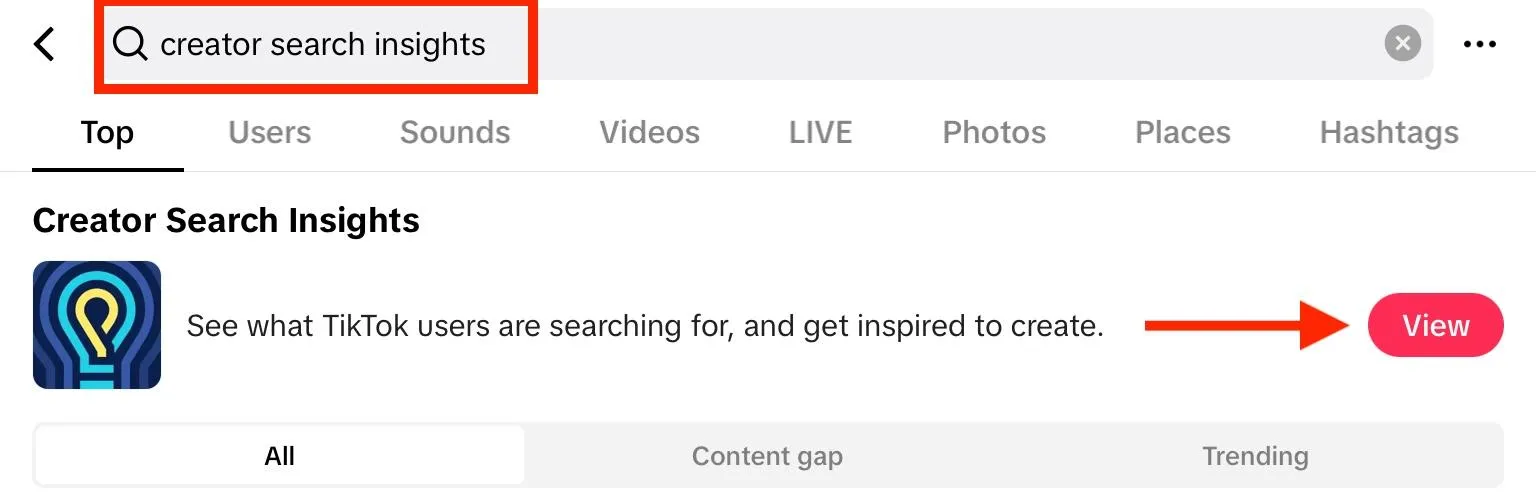
From here you can tap a topic to see its search popularity, relevant videos, and searches related to that topic.
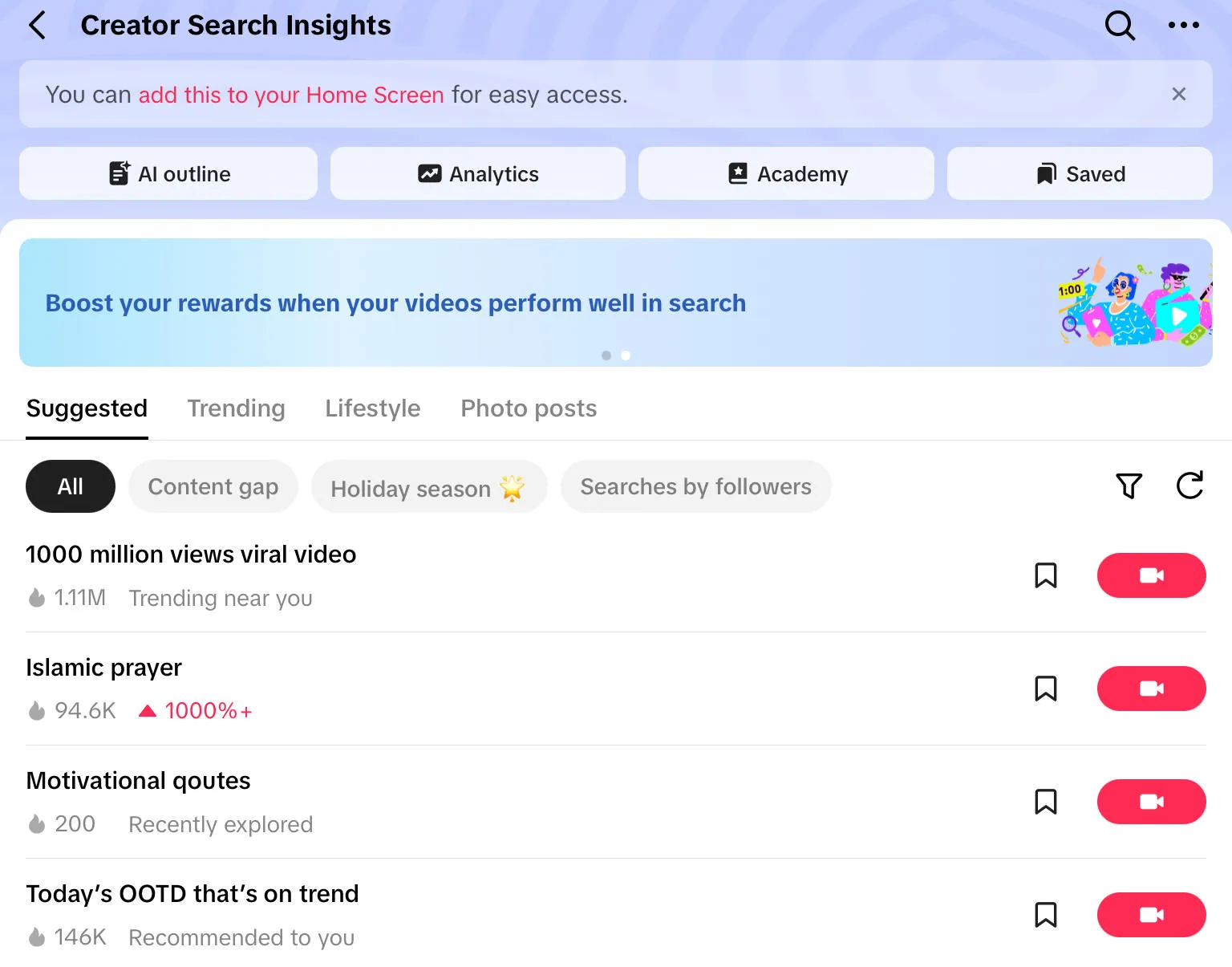
Integrate this information into your content strategy, captions, and hashtags for future videos.
Monetizing Your TikTok Content
Making money from your TikTok videos is the endgame for every creator, but you can’t just post content and hope for the best. To monetize your content, you’ll need to qualify for TikTok’s Creativity Program.
To be accepted, you’ll need to meet the following requirements:
-
Be at least 18 years or older
-
Be located in the USA
-
Have at least 10,000 followers
-
Have earned at least 100,000 views within the last 30 days
How To Sign Up For The Creativity Program
-
Open your TikTok profile and tap the three lines on the top right corner.
-
Tap Settings.
-
Tap Creator Tools > Creator Fund
-
Fill out the application. You will receive notification of the decision within 3 days.
You can learn about monetizing your TikTok content, including TikTok’s pay rates, in our guide here.
How To Grow Your TikTok Audience Fast
More followers means more viewers, which translates into more earnings as a creator. But unfortunately TikTok’s algorithm prioritizes content that’s already gaining tons of engagement from the get-go, so where does that leave new creators?
The trick is to start building a foundation of engagement from the very beginning, so your profile looks established to any visitors and to TikTok’s algorithm.
You can do this by buying TikTok followers, viewers, and other forms of engagement from QQTube. This will allow you to create the appearance of a popular profile and viral videos, without having to wait ages for the algorithm to notice you.
It’s also useful if you want to quickly start monetizing your content, as the TikTok Creativity Program requires 10,000 followers and you need 1,000 followers to add a custom URL to your profile page.
Frequently Asked Questions
How many TikTok followers do I need to make $2000 a month?
That depends on how many of those followers watch your content, and what region you’re located in. Learn more about TikTok monetization here.
What's the 3 second rule on TikTok?
The 3 second rule states that you should aim to capture your audience’s attention within the first 3 seconds of your video.
Can anyone be a creator on TikTok?
Yes, as long as you live in a country that allows TikTok and you’re at least 13 years of age, you can start creating content on the platform.
How to become a paid content creator on TikTok?
Learn more about TikTok’s monetization requirements here.
How to become a content creator with no experience?
You gain experience by creating! Get started with our guide, which walks you through the basics of setting up your profile, determining a content strategy, and building your following.